Use a high-capacity NVMe Gen4 SSD (1TB or larger) for heavy Cubase projects and sample streaming.
I’ve spent years building and tuning DAW rigs, running large orchestral libraries and dense Cubase sessions. I know which SSD choices make tracking, mixing, and virtual instruments feel fast and reliable. This guide will answer what ssd should i use for heavy cubase music production with clear, practical advice. Read on to pick the right drive, avoid common mistakes, and set up an SSD layout that keeps your sessions smooth.

Why SSD choice matters for heavy Cubase projects
Choosing the right SSD changes how responsive your system feels. Cubase relies on fast disk access for project files, audio takes, and sample streaming. Slow drives can cause dropouts, long load times, and sluggish plugin scanning.
What ssd should i use for heavy cubase music production depends on your workflow. If you use many sample libraries, you need sustained read speeds and high IOPS. If you mainly record audio tracks, burst performance and reliability matter more.
My experience: swapping a SATA SSD for a modern NVMe cut load times in half. Larger sample libraries streamed with fewer glitches. That practical gain is why this choice matters.

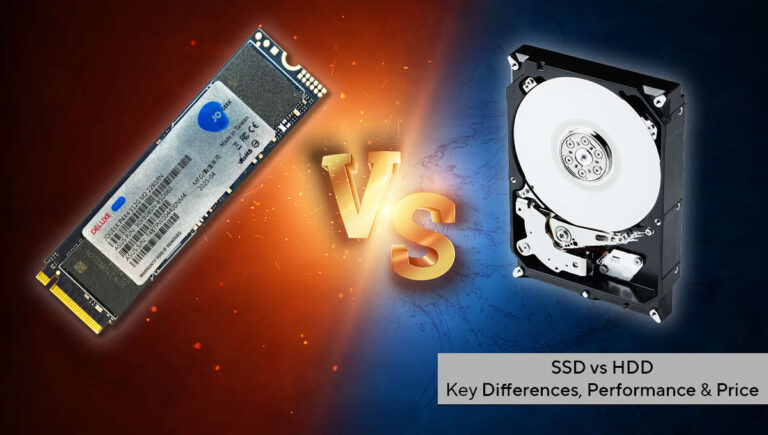
SSD types and interfaces: SATA, NVMe, PCIe Gen3 vs Gen4
SSDs come in flavors. Each has pros and cons for Cubase.
- SATA SSDs
- Good for budgets and backups.
- Max speeds around 500 MB/s. Fine for simple audio file storage.
- NVMe SSDs (M.2)
- Use PCIe lanes. Much faster than SATA.
- Great for OS, projects, and sample streaming.
- PCIe Gen3 vs Gen4
- Gen3 gives solid real-world gains over SATA.
- Gen4 doubles sequential bandwidth vs Gen3. Useful for huge sample pools.
- Real gains depend on your CPU and motherboard.
When asking what ssd should i use for heavy cubase music production, aim for NVMe M.2. If you can get Gen4, do it, but a quality Gen3 NVMe still performs very well.
Performance specs that matter for Cubase
Not all specs matter equally. Focus on real-world use.
- Sequential read/write speeds
- Help load big files and libraries fast.
- Important if you stream many samples at once.
- Random IOPS
- Drive many small reads from many files. Critical for sample libraries and plugin scanning.
- TBW (Terabytes Written) and endurance
- Shows drive lifespan under heavy write workloads.
- Heavy projects and frequent sample installs increase writes.
- DRAM and controller
- Drives with DRAM and a strong controller keep performance steady under load.
- DRAM-less drives can slow during sustained transfers.
Answering what ssd should i use for heavy cubase music production means picking a drive with high sequential read and good random IOPS, plus solid TBW ratings.

Recommended SSD capacity and endurance for Cubase
Capacity and longevity are practical choices. Here’s how to decide.
- 500 GB
- Good for OS and plugins only.
- Not enough for large sample libraries.
- 1 TB
- Minimum recommended for many workflows.
- Can hold OS, main projects, and a moderate library.
- 2 TB or larger
- Best for heavy sample users and long-term needs.
- Avoid constant juggling of libraries across drives.
For the question what ssd should i use for heavy cubase music production, I recommend 1 TB minimum and 2 TB if you use large orchestral or cinematic libraries. Also check TBW ratings and warranty. A higher TBW means the drive will last under constant installs and streaming.
Recommended SSD configurations and setups
A practical layout improves performance and safety. Here are setups I use and recommend.
- Single-drive build (budget)
- Use a fast NVMe (1 TB+) as the system drive.
- Store projects and a few libraries on it.
- Two-drive build (balanced)
- NVMe for OS, Cubase, and active projects.
- Second NVMe or SATA SSD for sample libraries and backups.
- Three-drive build (pro)
- NVMe Gen4 boot drive for OS and projects.
- Second NVMe for active sample libraries.
- Large SATA SSD or external drive for cold libraries and backups.
When considering what ssd should i use for heavy cubase music production, the two-drive layout gives the best value. Keep live samples on the fastest drive you can afford.

Practical setup tips and maintenance
A few practices keep your SSD fast and healthy.
- Enable TRIM in your OS
- TRIM helps maintain write performance over time.
- Leave free space
- Aim to keep 15–25% of the SSD free to avoid slowdowns.
- Overprovision if possible
- Allocate extra space for the drive controller to use for wear leveling.
- Use proper backup
- SSDs can fail. Keep a rolling backup strategy with external drives or cloud.
- Avoid RAID 0 for sessions
- RAID 0 can boost speed but increases risk of total data loss if a drive fails.
From my tests, SSDs slow once full. Cleaning up unused libraries and archiving old projects improves session stability. That matters when choosing what ssd should i use for heavy cubase music production.
Personal experience, lessons, and mistakes to avoid
I once bought a cheap NVMe without DRAM to save money. It worked fine for light tasks but struggled when I streamed three large libraries. I had dropouts and long load times. Lesson: buy a drive with a solid controller and DRAM when running heavy Cubase projects.
Other tips from my studio:
- Use a separate fast drive for sample libraries when possible.
- Keep your OS and Cubase on a different drive than your active samples.
- Regularly update firmware and drivers for your SSD and motherboard.
If you wonder what ssd should i use for heavy cubase music production, take my experience as a warning: cheap low-end drives can cost more time and frustration than they save.
Quick PAA-style questions
How much SSD speed do I really need for sample streaming?
Aim for an NVMe with high sustained read speeds and high random IOPS. This keeps many instruments streaming without dropouts.
Is NVMe Gen4 worth the extra cost for Cubase?
Gen4 is worth it if you stream huge libraries or run many instances of sample players. For smaller setups, Gen3 still performs well.
Can I use an external SSD for my libraries?
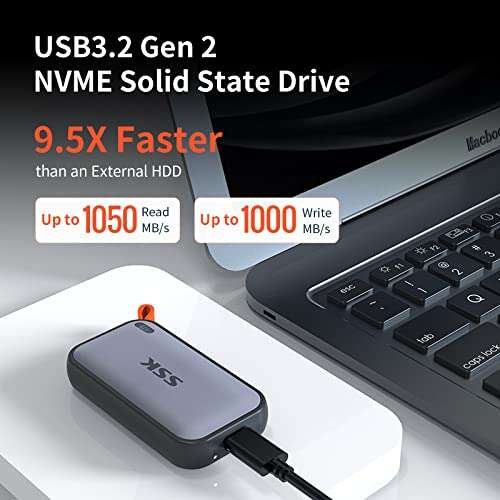
Yes. Use a fast USB-C/Thunderbolt drive with UASP or NVMe enclosure. Expect slightly higher latency than internal NVMe.
Frequently Asked Questions of what ssd should i use for heavy cubase music production
What is the best SSD type for Cubase?
NVMe M.2 drives are best for Cubase due to fast read/write speeds and low latency. They improve load times and sample streaming over SATA SSDs.
How much capacity should I buy for heavy projects?
Aim for at least 1 TB for the system and active projects, and 2 TB or more if you use large sample libraries. More space reduces the need to move libraries frequently.
Does TBW matter for music production?
Yes. TBW indicates endurance and helps predict drive lifespan under heavy write workloads. Choose a drive with a higher TBW for frequent installs and large transfers.
Is a consumer NVMe okay or do I need a pro drive?
High-end consumer NVMe drives are fine for most music production. Pro drives offer higher endurance and sustained performance for studio-grade reliability.
Should I put samples on the same drive as my OS?
It’s safer to separate them. Putting samples on a second NVMe or SSD reduces contention and keeps OS/DAW performance stable during heavy streaming.
Conclusion
Choosing the right SSD makes Cubase run smoother and keeps your creative flow uninterrupted. For heavy Cubase music production, prioritize NVMe M.2 drives with good random IOPS, high sustained read speeds, and solid TBW ratings. Start with a 1 TB NVMe and scale to 2 TB or more if you run large sample libraries. Set up a dedicated drive layout, enable TRIM, and keep backups to protect your work.
Take action today: review your current drives, plan a two-drive setup if possible, and upgrade to an NVMe that matches your workload. If you found this guide useful, leave a comment with your setup or questions — I’ll help you choose the right SSD for your Cubase rig.

Jamie Lee is a seasoned tech analyst and writer at MyTechGrid.com, known for making the rapidly evolving world of technology accessible to all. Jamie’s work focuses on emerging technologies, product deep-dives, and industry trends—translating complex concepts into engaging, easy-to-understand content. When not researching the latest breakthroughs, Jamie enjoys exploring new tools, testing gadgets, and helping readers navigate the digital world with confidence.