

Finding the best 2TB SSD for a gaming laptop means balancing speed, heat, endurance, fit, and real-world value.
Running out of space after installing a few large games is frustrating, especially when modern titles can use 100GB or more. A fast 2TB drive gives your laptop room for games, clips, mods, and school or work files without forcing constant uninstalling. I also look beyond headline speed because a drive must fit the laptop, stay cool, and perform well during long sessions. The options below include internal NVMe SSDs, SATA upgrades, and complete gaming laptops with 2TB storage. I explain where each product fits best, including its limits, so you can buy with confidence.
Crucial P310 2TB Gen4 NVMe SSD

The Crucial P310 is one of the strongest choices here for a modern gaming laptop with an open M.2 2280 slot. It uses PCIe Gen4 NVMe technology and lists sequential read speeds of up to 7,100MB/s. That speed helps games load quickly and makes large file transfers feel much less painful. The 2TB capacity also gives you useful room for a large game library.
I like this drive because it focuses on the needs of gamers without adding a bulky heatsink that may not fit inside a thin laptop. Its compact design suits many laptops, desktops, and handheld gaming systems, but you should still check your laptop manual before buying. The included Acronis software can help with cloning and recovery tasks. For most compatible systems, this is the best 2TB SSD for gaming laptop users who want high Gen4 speed and simple installation.
Pros:
- Fast PCIe Gen4 read performance
- Large 2TB capacity for modern games
- Compact M.2 2280 design
- Works with many laptops and desktops
- Includes useful recovery and cloning software
- No oversized heatsink to block a laptop cover
Cons:
- Requires an available compatible M.2 slot
- Performance depends on the laptop’s PCIe generation
- Heavy sustained writes may raise drive temperature
NIMO 17.3-Inch Gaming Laptop, 2TB

This NIMO laptop takes a different approach because it includes the 2TB SSD from the start. Its AMD Ryzen 9 8945HS processor offers eight cores and sixteen threads, with a listed boost speed of up to 5.2GHz. It also includes 64GB of DDR5 memory, which is far more than most gaming laptops need. The built-in 2TB drive gives you a ready-to-use setup without an immediate storage upgrade.
The Radeon 780M integrated graphics are suitable for esports games, older titles, indie games, and many games at sensible settings. They do not match a dedicated RTX graphics chip in demanding new AAA games. The large 17.3-inch screen can feel comfortable at a desk, while 100W USB-C power delivery adds useful charging flexibility. I see this as a practical all-round laptop for users who value memory, storage, and screen size more than top-tier graphics.
Pros:
- Includes a spacious 2TB SSD
- Powerful Ryzen 9 processor for daily work
- Generous 64GB DDR5 memory
- Large 17.3-inch display area
- Fingerprint reader adds easy login
- 100W power delivery improves charging flexibility
Cons:
- Integrated graphics limit demanding AAA gaming
- Large chassis is less portable than a 15-inch laptop
- Gaming performance varies by resolution and settings
NIMO 17.3-Inch Ryzen 9 Laptop, 2TB

This second NIMO listing uses the same broad formula: a 17.3-inch laptop, Ryzen 9 8945HS processor, 64GB DDR5 RAM, and a 2TB SSD. That combination is attractive for a buyer who wants one machine for gaming, study, creative work, and office tasks. The large memory pool helps with many browser tabs, virtual machines, and editing apps. The SSD should also keep Windows startup and game launches responsive.
The key point is the Radeon 780M graphics solution. It can handle lighter gaming well, but it is not a replacement for a laptop with a dedicated GeForce RTX GPU. I would choose this model for portable work and casual gaming rather than ray tracing or high-refresh AAA play. As a complete system, it may still be more convenient than buying a laptop and upgrading its storage later.
Pros:
- 2TB storage comes installed
- Ryzen 9 CPU handles demanding everyday tasks
- 64GB DDR5 RAM supports heavy multitasking
- Large display suits desk-based use
- Fingerprint login is quick and convenient
- Useful USB-C fast-charge support
Cons:
- Integrated Radeon graphics are not ideal for new AAA games
- 17.3-inch size may feel heavy for travel
- Storage upgrade options should be checked before purchase
Samsung 870 EVO 2TB SATA SSD

The Samsung 870 EVO remains a dependable choice for an older gaming laptop with a 2.5-inch SATA bay. It offers up to 560MB/s read speed, which is close to the practical limit of the SATA interface. Compared with a mechanical hard drive, it can make Windows feel much quicker and reduce game load times. Its 2TB capacity is enough for a useful mix of games, media, and documents.
This drive makes the most sense when your laptop does not support an NVMe upgrade. It cannot match a PCIe Gen4 model in benchmark numbers, but game frame rates usually depend more on the processor and graphics chip than on peak SSD speed. Samsung’s long-running EVO line also has a strong reputation for broad compatibility. I recommend it as the best 2TB SSD for gaming laptop owners who need a proven 2.5-inch SATA replacement.
Pros:
- Reliable 2.5-inch SATA format
- Up to 560MB/s read speed
- Large 2TB capacity
- Excellent upgrade over a hard disk drive
- Broad compatibility with older laptops
- Simple choice for a boot drive or game library
Cons:
- Much slower than modern NVMe SSDs
- Needs a 2.5-inch bay and SATA connection
- May require a mounting bracket or SATA cable
ASUS V16 RTX 5070 Gaming Laptop, 2TB

The ASUS V16 is a complete gaming laptop built around a dedicated RTX 5070 Laptop GPU. It includes 32GB of DDR5 memory and a 2TB SSD, so it has the core parts I want in a modern gaming system. The dedicated graphics chip matters far more than a small difference between two fast NVMe drives. With this kind of hardware, the 2TB drive can hold several large games without filling up immediately.
This is a better fit for serious gaming than the integrated-graphics NIMO models above. It should suit players who want stronger visual quality, higher frame rates, and access to modern graphics features. Exact results will depend on the laptop’s power limits, cooling, game settings, and display resolution. If you want a complete machine instead of an SSD-only upgrade, this is a strong option to consider in 2026.
Pros:
- Dedicated RTX 5070 Laptop GPU
- 2TB SSD offers useful game storage
- 32GB DDR5 RAM suits current gaming
- Ready-to-use Windows gaming system
- Better AAA performance than integrated graphics
- Good foundation for high settings and creative work
Cons:
- Complete laptop costs more than an SSD upgrade
- Gaming battery life will be limited under heavy load
- Display and power settings affect real-world GPU speed
ASUS ROG Strix G16 Gen 4 Gaming Laptop

The ROG Strix G16 is aimed at gamers who want a complete, high-performance setup. Its listed configuration includes an RTX 5070 Laptop GPU, an Intel Core Ultra 9 275HX processor, 32GB of DDR5 RAM, and a 2TB Gen4 SSD. The 16-inch ROG Nebula display adds a 2.5K resolution, 240Hz refresh rate, and 3ms response time. That screen can show fast motion with much less blur when the game and GPU produce enough frames.
The 2TB Gen4 SSD gives this laptop a strong balance of speed and capacity. I especially like the 16:10 display shape for games, editing, and daily work because it provides more vertical space than a standard 16:9 panel. Wi-Fi 7 support can help on compatible networks, though your router and internet plan still set the real limit. For users shopping for the best 2TB SSD for gaming laptop as part of a complete premium system, the ROG Strix G16 is an impressive package.
Pros:
- Fast 2TB PCIe Gen4 storage
- Powerful Core Ultra 9 processor
- Dedicated RTX 5070 Laptop graphics
- Sharp 2.5K 240Hz display
- Fast 3ms listed response time
- 32GB DDR5 memory supports modern games
- Wi-Fi 7 provides current wireless support
Cons:
- Premium hardware increases the price
- High-refresh gaming uses significant power
- Large performance laptops can be loud under load
Lenovo Legion Pro 7i Gen 10, 2TB

The Lenovo Legion Pro 7i is the most powerful complete laptop in this group. The listed configuration pairs an Intel Core Ultra 9 275HX processor with an RTX 5080 Laptop GPU carrying 16GB of graphics memory. It also includes 64GB of RAM and 2TB of NVMe storage, shown as two 1TB drives. This arrangement may offer useful storage flexibility, but buyers should confirm the exact slot layout and upgrade details before making changes.
The 16-inch WQXGA OLED screen has a listed 240Hz refresh rate and up to 500 nits of brightness. OLED can deliver deep blacks and rich contrast, while the high refresh rate helps competitive games feel smooth. This is not the value pick for someone who only needs more storage. It is the best complete gaming laptop here for demanding players who want flagship graphics, a premium display, and enough 2TB space for a serious library.
Pros:
- Very powerful RTX 5080 Laptop GPU
- 16GB graphics memory suits demanding games
- 64GB RAM handles heavy multitasking
- Fast 240Hz OLED display
- 2TB NVMe storage in a flexible setup
- High-end processor supports gaming and creation
Cons:
- High purchase price
- Two 1TB drives may not suit every upgrade plan
- Large power demands reduce unplugged gaming time
- OLED panels need sensible care with static content
Crucial BX500 2TB SATA SSD

The Crucial BX500 is a simple 2TB SATA SSD for laptops with a 2.5-inch drive bay. It lists read speeds of up to 540MB/s, which is a major step up from a traditional hard drive. That upgrade can shorten boot times, reduce menu waits, and make older gaming laptops feel less sluggish. Its 3D NAND design helps keep the drive compact and affordable.
I would consider the BX500 when price matters and the laptop cannot accept an M.2 NVMe drive. It is not the fastest 2TB SSD for gaming laptop buyers with a Gen4 slot, but it can still work well as a game library drive. Installation is usually straightforward, though some laptops need a spacer, bracket, or cable. Always verify the bay and connector before opening the machine.
Pros:
- Affordable 2TB SATA capacity
- Up to 540MB/s read speed
- Good upgrade from a mechanical hard drive
- Thin 2.5-inch design
- Useful for older gaming laptops
- Simple storage solution for games and media
Cons:
- Slower than NVMe storage
- May need a spacer or SATA cable
- Not suitable for laptops with M.2-only storage
Samsung 990 1TB NVMe SSD

This Samsung drive is included for shoppers who value speed but do not need 2TB in one device. The listed 1TB model reaches up to 7,150MB/s read and 6,450MB/s write speeds. Those numbers indicate fast PCIe NVMe performance for supported systems. It can make large transfers and system tasks feel quick, although game loading gains over other good NVMe drives may be modest.
The smaller capacity is the main reason it does not rank as the best 2TB SSD for gaming laptop use. A 1TB drive can fill quickly after installing a few major releases, especially with texture packs and recorded gameplay. Still, it can serve well as a boot drive or second drive in a laptop with multiple M.2 slots. Check whether the model includes a heatsink, and avoid versions that cannot fit under your laptop’s cover.
Pros:
- Very fast listed read performance
- Strong write speed for large transfers
- Compact NVMe form factor
- Good choice for a boot drive
- Useful as a second internal drive
- Well suited to compatible PCIe systems
Cons:
- Only 1TB of listed capacity
- May be excessive for basic gaming needs
- Laptop clearance must be checked carefully
Silicon Power A55 2TB SATA SSD
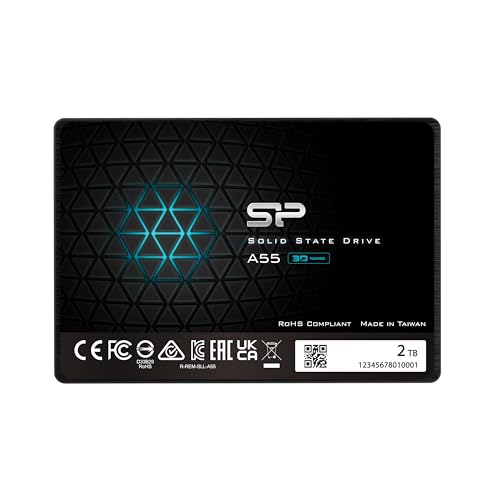
The Silicon Power A55 is another practical 2.5-inch SATA upgrade. It uses 3D NAND and an SLC cache to help improve short bursts of write activity. The 2TB capacity gives older laptops plenty of room for games, videos, and personal files. Its 7mm thickness fits many slim laptop bays, but the laptop’s mounting hardware still matters.
This drive is best for a budget-conscious buyer who wants more space without chasing NVMe benchmark scores. It can turn a hard-drive-based laptop into a much more responsive machine. Like other SATA SSDs, it will not reach the speed of the Crucial P310 or Samsung NVMe models. If your laptop only offers SATA storage, the A55 can be a sensible and economical path to a 2TB gaming library.
Pros:
- Large 2TB storage size
- Thin 7mm SATA design
- 3D NAND supports everyday use
- SLC cache helps with short write bursts
- Good upgrade for older laptops
- Usually easy to install in a 2.5-inch bay
Cons:
- SATA interface limits peak speed
- Sustained writes may slow after the cache fills
- Compatibility depends on a 2.5-inch bay
My Recommendation
For a laptop that has an open PCIe Gen4 M.2 slot, I would choose the Crucial P310 2TB first. It offers excellent listed speed, useful capacity, and a laptop-friendly design without an oversized heatsink. For an older SATA-only laptop, the Samsung 870 EVO is the safer premium pick, while the Crucial BX500 and Silicon Power A55 offer more budget-focused alternatives.
The complete laptops serve a different buyer. The ASUS ROG Strix G16 and Lenovo Legion Pro 7i make sense when you need a whole gaming system with dedicated graphics. The NIMO models suit lighter gaming and broad everyday use, but their integrated Radeon graphics limit demanding titles. In my view, the best 2TB SSD for gaming laptop buyers is the Crucial P310 when your system supports Gen4 NVMe storage.
| Best for | Why |
|---|---|
| Gen4 laptop storage upgrade | Crucial P310 combines fast performance with 2TB capacity. |
| Older SATA gaming laptop | Samsung 870 EVO offers strong compatibility and dependable speed. |
| Complete premium gaming system | Lenovo Legion Pro 7i adds powerful RTX 5080 graphics and 2TB NVMe storage. |
How to Choose the Best 2TB SSD for Gaming Laptop
Start by checking the storage slot, not the speed printed on the box. Many newer laptops use an M.2 2280 NVMe slot, while older models may use a 2.5-inch SATA bay. Some laptops include both, but others include only one. Your owner’s manual or laptop maker’s support page should confirm the correct type.
Next, check the PCIe generation. A PCIe Gen4 SSD can work in many older systems, but it may run at the slower speed supported by the laptop. A Gen4 drive also works in a compatible Gen5 slot, though it will not gain Gen5 speed. For gaming, a good Gen4 SSD already offers an excellent balance of speed, heat, and price.
Capacity matters more than many buyers expect. A 2TB SSD does not provide a full 2,000GB of usable space because the operating system, formatting, and drive management use some room. I suggest leaving some free space rather than filling the drive completely. A nearly full SSD may have less room for background management and large updates.
Heat also matters in a gaming laptop. Desktop SSDs sometimes include tall heatsinks that do not fit beneath a laptop cover. Choose a bare M.2 drive or a model confirmed for laptop use. Good airflow, updated firmware, and sensible power settings can help maintain steady performance during long downloads and installs.
NVMe or SATA: Which Is Better for Gaming?
NVMe is faster and usually the better choice for a new gaming laptop. It connects through PCIe and can deliver far higher sequential speeds than SATA. This helps with large file transfers and some demanding load tasks. NVMe drives also use a small M.2 card, which saves space inside many modern laptops.
SATA still has a place. If your laptop has a 2.5-inch bay, a SATA SSD can be one of the best upgrades for the money. It will make the system feel much faster than a hard drive, even though its peak speed is lower. In normal game play, the graphics processor still controls frame rate, so a SATA SSD does not automatically mean poor gaming.
For most buyers, I would not pay a large premium for tiny loading gains. A reliable 2TB drive with good support is often a smarter choice than the fastest benchmark champion. The best 2TB SSD for gaming laptop use is the one that fits correctly and delivers steady performance at a fair price.
Does a 2TB SSD Improve FPS?
An SSD usually does not create a large increase in average FPS. Frame rate depends mainly on the GPU, CPU, memory, game settings, and cooling system. The SSD helps with boot time, game loading, texture streaming, updates, and level transitions. It makes the whole experience feel less like waiting in line.
Some newer games use advanced storage systems to stream assets during play. In those cases, a fast NVMe drive may help reduce pauses or texture delays. The benefit depends on the game and the laptop platform. I still view capacity and reliable sustained speed as more important than chasing the highest advertised number.
Installation and Cloning Tips
Back up important files before opening your laptop. If you replace the original boot drive, you can either install Windows from scratch or clone the old drive. Cloning saves time, but the new drive must have enough usable space for the data being copied. The Crucial P310 listing includes Acronis recovery software, which may help with this process.
Shut the laptop down fully and disconnect its charger before installation. Some models use a battery disconnect setting in the firmware, so follow the maker’s guide. Use the correct small screwdriver and do not force the M.2 retaining screw. Static electricity can harm computer parts, so touch a grounded metal object and handle the drive by its edges.
After installation, check whether the laptop detects the drive in firmware and Windows Disk Management. Update the SSD firmware only through the maker’s trusted software or support page. Then confirm that the drive has the correct partition style and enough free space. These small checks prevent many common upgrade problems.
FAQs Of best 2tb ssd for gaming laptop
Is 2TB enough for a gaming laptop?
For most players, 2TB is a strong starting point. It can hold a large collection of games, but some major titles use more than 100GB each. Leave free space for updates and system files.
What is the best 2TB SSD for gaming laptop use?
The Crucial P310 is my top pick for a compatible PCIe Gen4 M.2 laptop. It offers high listed read speed, useful capacity, and a laptop-friendly design. Confirm your slot before ordering.
Can I use a Gen4 SSD in an older laptop?
Often, yes. A Gen4 SSD can work in a compatible older PCIe slot, but it will run at the speed supported by that laptop. Check the laptop manual for slot type and size.
Is SATA SSD storage still good for gaming?
Yes. A SATA SSD is much faster than a hard drive and can improve boot and load times. It is a good choice for older laptops, although NVMe offers higher peak performance.
Should I buy an SSD with a heatsink for my laptop?
Usually not unless the laptop maker supports it. Many desktop heatsinks are too tall for laptop storage bays. A slim drive without a large heatsink is normally safer.
Final Verdict: Which Should You Buy?
For a compatible Gen4 laptop, the Crucial P310 is the best 2TB SSD for gaming laptop upgrades. Choose the Samsung 870 EVO for a SATA-only system.
Check the slot, clearance, and warranty before buying. The right 2TB SSD adds space, speed, and fewer loading screens.

Everett Ashford is a tech reviewer at mytechgrid.com specializing in SSDs, cameras, TVs, earbuds, headphones, and other consumer electronics. He provides honest, data-driven reviews based on hands-on testing and real-world performance analysis. Everett simplifies complex tech details to help readers make smart, confident buying decisions.

One Comment