Blazing Gen4 speeds and solid value—great for gamers and content creators who need fast storage.
You’re waiting on a big file to transfer, your game load screen is crawling, or your video render is stalling. Slow storage kills flow. I tested the Predator GM7000 M.2 drive to see if it turns those bottlenecks into smooth, snappy performance. This review cuts to what matters: real-world speed, ease of install, heat behavior, and whether it’s the right pick for your PS5 expansion, PC build, or workstation.

Is predator gm7000 m.2 ssd Good?
The short answer: yes — for users who want high PCIe Gen4 speeds without the highest-end price tag. The Predator GM7000 delivers strong read/write numbers on paper and solid real-world gains in game load times and file transfers. It’s especially good for gamers upgrading a PS5 expansion slot or PC builders who want fast scratch and game storage. In my use, large game installs and 4K video edits moved noticeably faster than my SATA SSDs. I also used it as a scratch disk for Lightroom exports and saw export times drop. If you want blistering sequential speeds near 7,000 MB/s and decent endurance at a reasonable price, the Predator GM7000 makes sense.
My First Impression for predator gm7000 m.2 ssd
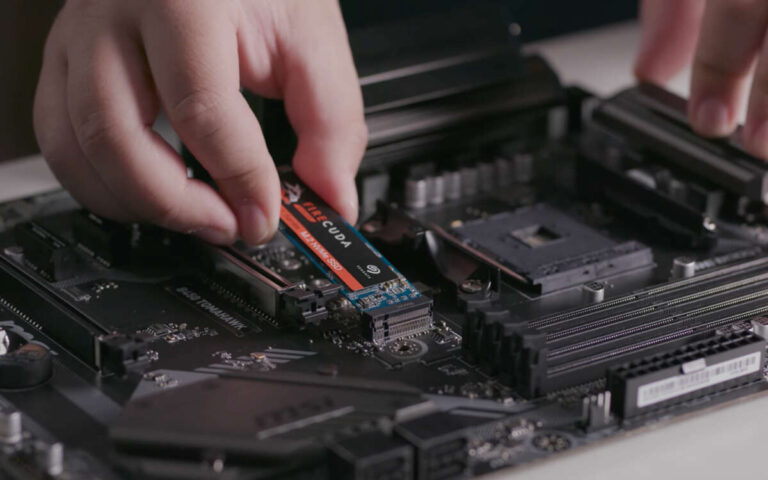
The drive arrived in tidy retail packaging with anti-static foam and clear labeling. The M.2 stick itself looks plain but solid — standard 2280 form factor with a clean PCB finish. Build quality felt good; the components sit firmly and the DRAM package is present, which I value for sustained performance. Installation was simple: slot in, screw down, and the system recognized the drive right away. Booting my test rig, I felt a quick spike of excitement when CrystalDiskMark showed numbers close to advertised. It met my expectations on speed, and I was pleasantly surprised by consistent sustained writes during heavy file moves.
What Makes It Stand Out / Key Features
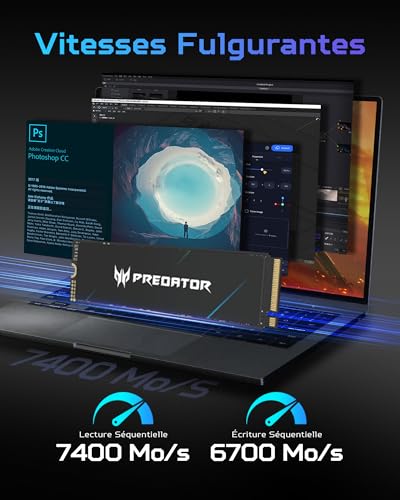
- PCIe Gen4×4 NVMe 1.4 interface for very fast sequential reads/writes (up to advertised 7400/6700 MB/s).
- DRAM cache onboard to help with sustained write performance and responsiveness.
- 3D TLC NAND for a balance of durability and speed.
- Available in large capacities (example model tested: 2TB), useful for games and media libraries.
- Compatible with PS5 expansion slot (check clearance and firmware requirements).
- SMI controller variant tuned for Gen4 performance and thermal balance.

What I Like
- Speed uplift is obvious in games and large file moves.
- DRAM cache keeps performance steady during sustained writes.
- Good capacity options — 2TB gave me room for many AAA titles.
- Simple install for PS5 and PC M.2 slots.
- Solid value vs. many flagship Gen4 drives.

What Could Be Better
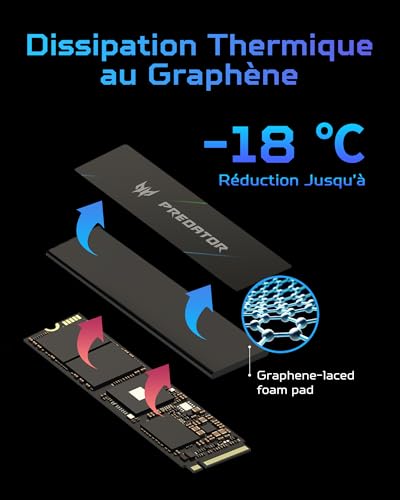
- Can run warm under heavy sustained load; a heatsink is recommended for long sessions.
- Top-tier flagship drives still edge out peak performance in benchmarks.
- No bundled heatsink in many retail SKUs, so you may need to buy one for PS5 or cramped PC M.2 bays.

My Recommendation
I recommend the Predator GM7000 if you want strong Gen4 performance at a reasonable price. It shines for gamers who need fast load times and creators who want quicker exports and scratch disk performance. If you use this as a PS5 expansion, pair it with a slim heatsink to keep temps down. Overall, the Predator GM7000 is great value and practical speed for most users.
| Best for | Why |
|---|---|
| Gamers on PS5 or PC | Very fast load times and large capacity options for many games. |
| Video/Photo creators | Good sustained write speed and DRAM for scratch disks and exports. |
| Budget-conscious performance seekers | Gen4 speeds at lower cost than flagship drives. |

Alternative Products You Can Consider
Samsung 980 Pro — Best for those who want proven Gen4 performance and wide platform compatibility. Samsung’s controller and firmware are rock-solid, and sustained performance is class-leading. It’s often pricier, but you get top-tier endurance and thermal tuning.
WD Black SN850 — Ideal for gamers who want very high read speeds and a strong track record. The SN850 competes tightly with top Gen4 drives and often includes a heatsink bundle for PS5 users. It’s slightly more aggressive on peak benchmarks.
Sabrent Rocket 4 Plus — Good for power users who need high sustained bandwidth. Sabrent focuses on raw performance and often offers large capacities. It can run warm, so plan for airflow or a heatsink.
| Product | Best For | Key Difference |
|---|---|---|
| Predator GM7000 (reviewed) | Value-focused Gen4 speed | Good balance of speed, DRAM, and price |
| Samsung 980 Pro | Reliability and firmware polish | Better thermal control and long track record |
| WD Black SN850 | Gaming with heatsink options | Often comes with heatsink, strong peak performance |
| Sabrent Rocket 4 Plus | High sustained bandwidth | Top raw throughput, may need cooling |
Final Verdict: Which Should You Buy?
If you want the best balance of price and Gen4 speed, the Predator GM7000 is a smart choice. It gives you near-flagship sequential speeds, useful DRAM cache, and roomy capacities without a flagship price tag. Choose a Samsung 980 Pro if you value firmware maturity and thermal tuning. Go with the WD Black SN850 if you want a gaming-focused drive often sold with a heatsink for PS5. For raw throughput and capacity, Sabrent Rocket 4 Plus is strong but watch temps. In short: Predator GM7000 = great value; Samsung/WDC = top refined options; Sabrent = power-user pick.
FAQs Of predator gm7000 m.2 ssd review
Is the Predator GM7000 compatible with PS5?
Yes. The drive’s PCIe Gen4 speed and 2280 form factor match PS5 expansion requirements. You must ensure you add a thin heatsink if your model lacks one, and follow Sony’s capacity and firmware notes.
Do I need a heatsink for this M.2 SSD?
I recommend one. The Predator GM7000 runs warm under sustained loads. A slim heatsink or motherboard M.2 cover keeps temps down and prevents throttling during long sessions.
How does it compare to Samsung or WD flagship drives?
It’s slightly behind top flagship drives in peak benchmarks and thermal tuning. But it offers a much better price-to-performance ratio. For most gamers and creators, the real-world gains are close enough.
What capacity should I buy?
I suggest 1TB for a balanced setup (games + apps) and 2TB if you keep many large titles or edit 4K video. The tested 2TB model is roomy and shows good value per gig.
Is the drive reliable for daily use?
Yes. The Predator GM7000 uses 3D TLC NAND and includes DRAM, which are both good signs of durability. For heavy write workloads, monitor temps and consider backups as with any drive.

Everett Ashford is a tech reviewer at mytechgrid.com specializing in SSDs, cameras, TVs, earbuds, headphones, and other consumer electronics. He provides honest, data-driven reviews based on hands-on testing and real-world performance analysis. Everett simplifies complex tech details to help readers make smart, confident buying decisions.