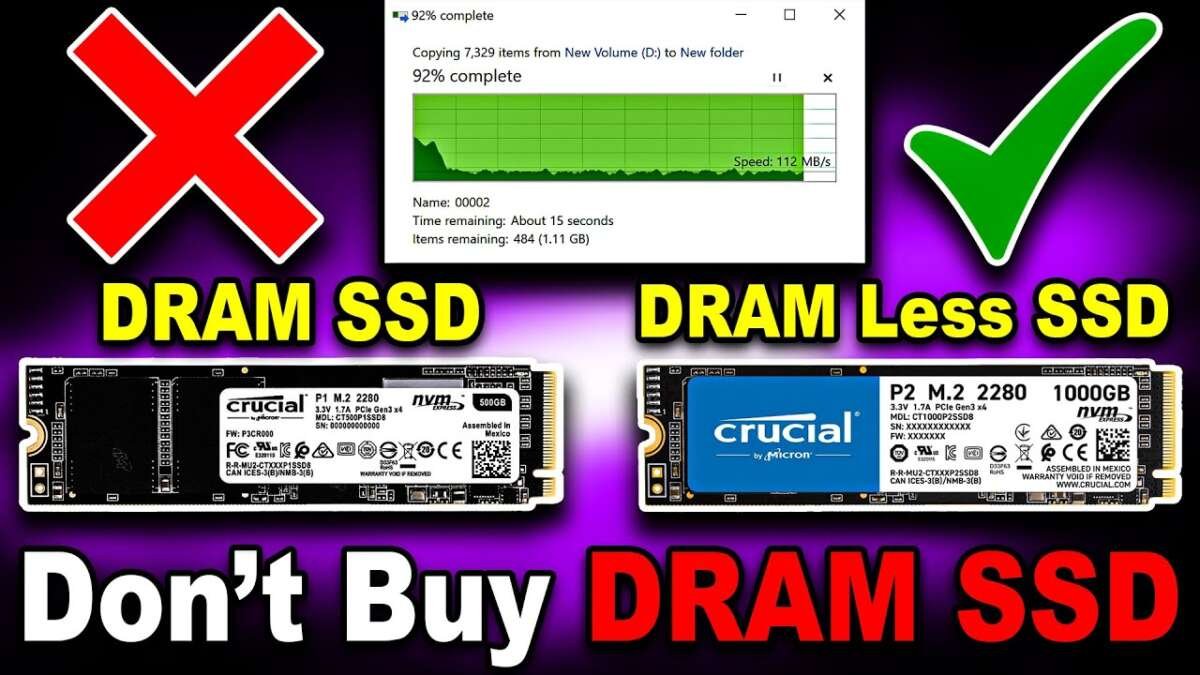
DRAM in an SSD is fast memory that stores the mapping between data locations and files.
Understanding what is DRAM in SSD technology can help you choose the right drive for a laptop, gaming PC, workstation, or server. DRAM affects how an SSD finds data, handles many tasks, and maintains steady performance. This guide explains how it works, when it matters, and whether a DRAM-less SSD can still be a smart buy.
What is DRAM in an SSD?
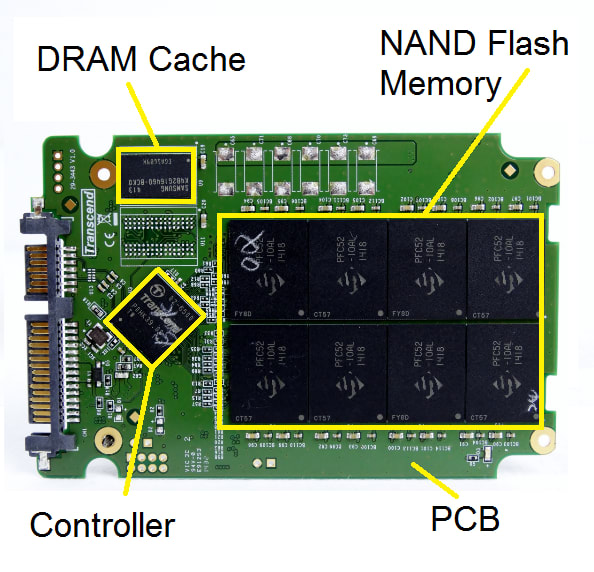
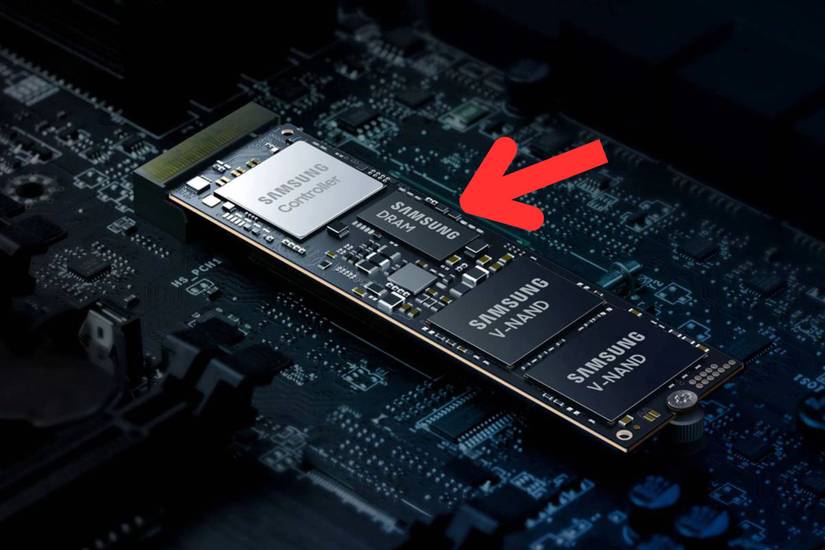
DRAM stands for Dynamic Random Access Memory. In an SSD, it acts as a fast working space for the drive’s controller. The controller uses this space to store the Flash Translation Layer, or FTL.
The FTL is a map. It connects the logical addresses used by your operating system with the real locations of data inside NAND flash memory. When your computer asks for a file, the SSD checks this map to find the data quickly.
A simple way to understand what is DRAM in SSD design is to picture a large library:
• NAND flash is the library’s book storage.
• The SSD controller is the librarian.
• DRAM is the quick index that tells the librarian where each book is located.
Without this index, the controller must work harder to locate data. That can increase delay, especially during heavy workloads or when the drive is nearly full.
DRAM is volatile memory. This means it loses its contents when the SSD loses power. However, the mapping data is not permanently lost. The SSD can rebuild the map from information stored in NAND when it starts again.
How does DRAM work inside an SSD?
When you save, open, or delete a file, the SSD does not place that file in one simple, permanent spot. NAND flash is divided into pages and blocks. Data may move over time because of garbage collection, wear leveling, and other maintenance tasks.
The SSD controller tracks these changes. It keeps a table that says where the computer’s logical data is stored in the NAND chips. DRAM holds much of this table so the controller can access it with very low delay.
Here is the basic process:
-
Your operating system sends a read or write request.
-
The SSD controller checks the address in its mapping table.
-
DRAM helps the controller find the correct NAND location.
-
The controller reads or writes the data.
-
The mapping table is updated when data moves.
This process explains what is DRAM in SSD performance. DRAM does not store your files in the same way NAND does. Instead, it helps the SSD manage and locate those files.
A DRAM-equipped SSD may also use its memory for write buffering, error management, and background tasks. The exact design varies by brand, controller, NAND type, capacity, and firmware.
Why is DRAM important for SSD performance?
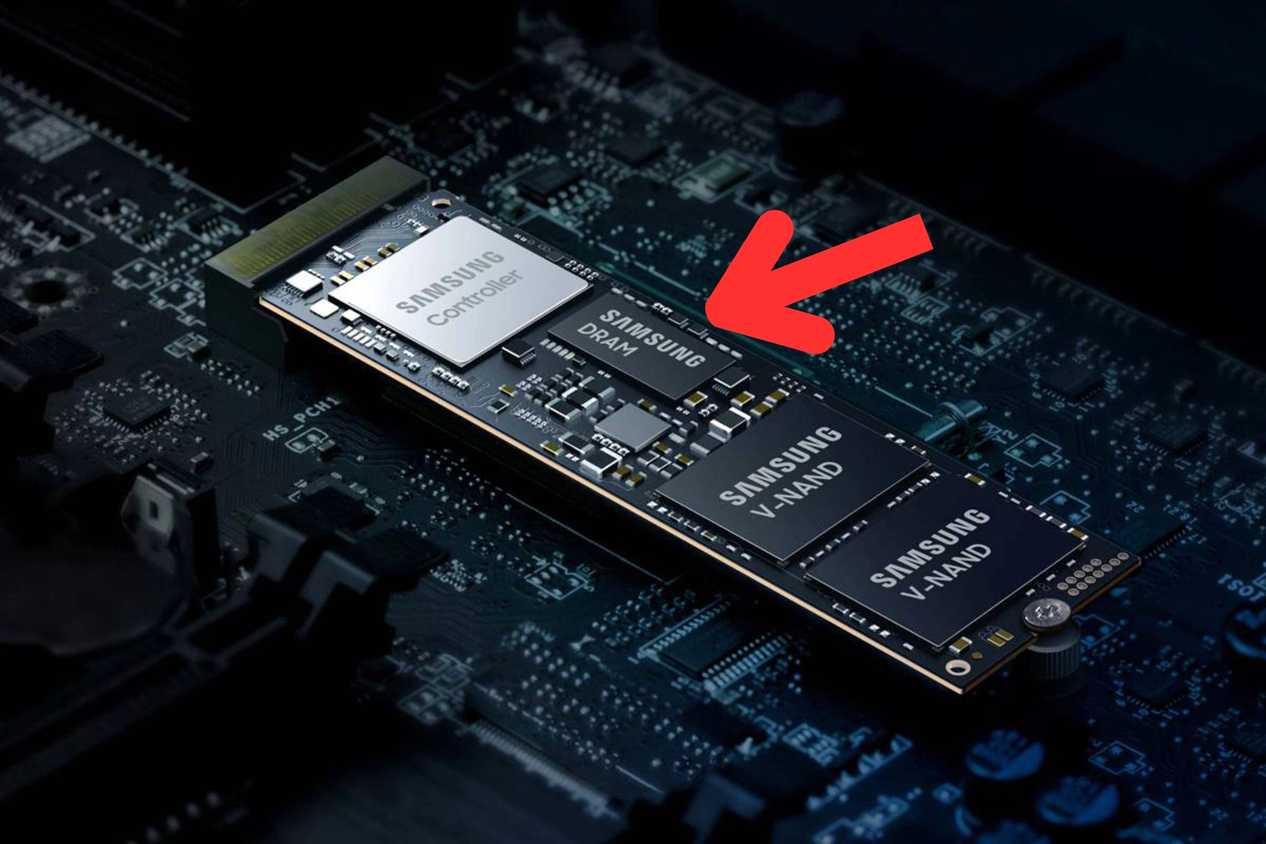
DRAM can reduce the time needed to find data. This matters most when an SSD handles many small files, random requests, or long workloads. Examples include video editing, software development, virtual machines, databases, and frequent file transfers.
A DRAM SSD often provides more consistent performance than a basic DRAM-less model. The difference may be small during a short file copy. It can become clear after the SSD cache fills or during repeated heavy use.
The main benefits include:
• Faster address lookup: The controller can find data without repeatedly checking slower NAND.
• Better random performance: Small file operations can feel more responsive.
• More stable long writes: Performance may remain steadier during large transfers.
• Lower controller workload: The controller has quick access to important mapping data.
• Improved multitasking: The drive can handle several requests with less performance loss.
Still, DRAM is not the only factor that controls SSD speed. NAND type, controller quality, firmware, interface speed, capacity, and temperature also matter.
For example, a high-quality DRAM-less PCIe 4.0 SSD may outperform an older DRAM-equipped SATA SSD in sequential transfers. But that does not mean it will always feel better during heavy random workloads.
This is an important lesson when asking what is DRAM in SSD hardware: DRAM is one part of the design, not a complete performance rating.
DRAM SSD vs. DRAM-less SSD
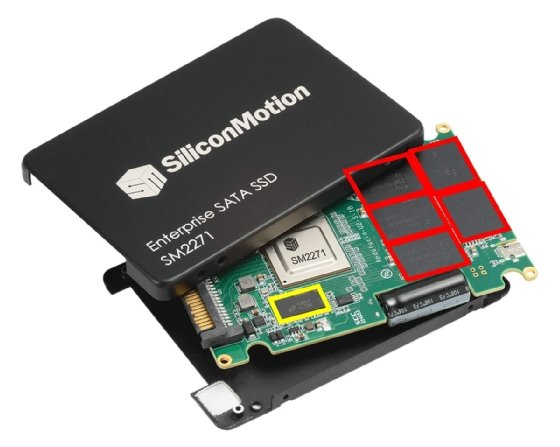
A DRAM SSD includes a dedicated memory chip, often using DDR3, DDR4, LPDDR4, or a similar type of memory. A DRAM-less SSD does not include dedicated DRAM for the mapping table.
Instead, a DRAM-less SSD may use several methods:
• It may store more of the mapping table in NAND.
• It may use a small amount of the controller’s internal memory.
• It may support Host Memory Buffer, or HMB.
HMB allows a DRAM-less SSD to reserve a small part of the computer’s system RAM. The SSD communicates with the operating system through PCIe to use that memory for selected mapping tasks.
HMB can improve performance, but it is not identical to built-in DRAM. System RAM is farther away from the SSD controller than onboard memory. Access can also depend on the operating system, driver support, platform, and firmware.
A DRAM-less SSD can work well in:
• Office computers
• Budget gaming systems
• Light home use
• Secondary storage
• Thin laptops where power and cost matter
A DRAM SSD is often better for:
• Workstations
• Video editing
• Large project files
• Virtual machines
• Heavy multitasking
• Database and server workloads
• Frequent large file writes
The best choice depends on your workload. The answer to what is DRAM in SSD buying decisions should always include how you use the drive, not just whether a specification box says “DRAM.”
Does DRAM make an SSD faster?
DRAM can make an SSD faster in certain tasks, but it does not guarantee a higher advertised speed. Manufacturers usually list peak sequential read and write speeds. These figures often come from short tests with ideal conditions.
Real use can be different. A drive may feel fast when opening apps but slow down during a long transfer. This can happen when the temporary SLC cache is full, the drive is nearly full, or the controller is performing garbage collection.
DRAM may help the SSD maintain performance during these demanding conditions. It can also reduce latency during random reads and writes. Latency means the delay before the drive responds to a request.
However, DRAM does not turn slow NAND into fast NAND. A drive with older or lower-quality flash may still perform poorly, even with a DRAM chip.
When comparing drives, check more than the DRAM specification:
• NAND type, such as TLC or QLC
• Controller model
• Total drive capacity
• Endurance rating, often shown as TBW
• Sustained write performance
• Warranty length
• Thermal behavior
• Independent reviews with long-duration tests
In practical testing, short benchmark results can make two SSDs look almost equal. Long file transfers often reveal the real difference. That is why I recommend looking for sustained performance tests rather than relying only on the maximum read speed printed on the box.
What is DRAM in SSD endurance and reliability?
DRAM does not directly determine how many times NAND flash can be written. NAND endurance depends more on the flash type, quality, controller, firmware, and how the drive manages wear.
The controller uses wear leveling to spread writes across the NAND cells. It also uses garbage collection to organize free space. DRAM can help these processes by giving the controller a faster place to store mapping information.
A DRAM SSD may therefore handle demanding workloads more smoothly. But it is not automatically more reliable than every DRAM-less SSD. A well-designed DRAM-less drive can offer good reliability for ordinary use.
You should also understand the difference between volatile mapping data and user data. The mapping table may sit in DRAM during operation, but the SSD keeps enough information in NAND to rebuild it after power is restored.
Power-loss protection is a separate feature. Enterprise SSDs and some professional models include capacitors that provide enough power for the drive to finish critical operations during an outage. Most consumer SSDs do not offer full power-loss protection, even if they have DRAM.
For important work, use backups. No DRAM design can protect your files from accidental deletion, malware, hardware failure, or physical damage.
Is a DRAM-less SSD bad?
No. A DRAM-less SSD is not automatically bad. It is designed to reduce cost, power use, and physical space. Many modern DRAM-less SSDs deliver excellent everyday performance.
For web browsing, documents, streaming, casual gaming, and normal app use, the difference may be hard to notice. HMB can also help newer DRAM-less PCIe SSDs perform well in desktop and laptop systems.
The limits usually appear under heavier workloads. A DRAM-less SSD may show:
• Lower random performance
• Greater performance changes as the drive fills
• More noticeable slowdowns during long writes
• Higher dependence on system RAM and firmware
• More delay during complex multitasking
Drive capacity also matters. Larger SSDs often have more NAND channels and can spread work across more memory chips. A 2TB model may perform differently from a 500GB version of the same product family.
My practical advice is simple: do not reject a DRAM-less SSD just because it lacks a DRAM chip. Instead, check professional reviews that test sustained writes, random access, thermals, and performance when the drive is nearly full.
The real answer to what is DRAM in SSD selection is about matching the drive to the job. A budget SSD for a home PC has different needs from a drive used for 4K video editing.

How to choose between a DRAM and DRAM-less SSD
Start by identifying your main workload. Think about what you do most often, not the most demanding task you might perform once a year.
Choose a DRAM SSD if you regularly:
-
Move large video or photo projects.
-
Build software or compile large code projects.
-
Run virtual machines.
-
Use professional design or engineering software.
-
Work with databases.
-
Perform frequent writes throughout the day.
Choose a DRAM-less SSD if you mainly:
-
Browse the web.
-
Use office apps.
-
Store games and media.
-
Upgrade an older laptop.
-
Need a low-cost secondary drive.
-
Want lower power use in a portable computer.
Keep at least 10% to 20% of the SSD free when possible. Free space gives the controller room for garbage collection and wear leveling. It can also help maintain performance over time.
Before buying, check these specifications and tests:
• Interface: SATA, PCIe 3.0, PCIe 4.0, or PCIe 5.0
• Form factor: 2.5-inch, M.2 2280, or another size
• NAND type: TLC is often a strong balance for general use
• Endurance: Compare the TBW rating with your expected writes
• Warranty: Review both years and coverage limits
• Cooling: High-speed NVMe drives may need a heatsink
• Sustained performance: Look beyond short benchmark bursts
If you are unsure what is DRAM in SSD marketing, look for a detailed product review. Some listings use vague terms such as “cache” or “high-speed memory,” which do not always mean the SSD has dedicated DRAM.
Common mistakes when buying an SSD with DRAM
One common mistake is assuming that DRAM always means the drive is better in every way. A low-quality DRAM SSD can still have weak firmware, poor NAND, or poor thermal control.
Another mistake is confusing DRAM with an SLC cache. An SLC cache uses some NAND flash in a faster mode to temporarily absorb writes. DRAM stores mapping data and controller information. They serve different purposes.
Buyers also sometimes compare only sequential speed. Sequential speed matters for large, continuous files. Random performance and latency matter more when opening apps, loading small files, or handling many tasks at once.
Other mistakes include:
• Filling the SSD to its maximum capacity
• Ignoring the drive’s temperature
• Buying the wrong M.2 size
• Installing a PCIe drive in a system that supports only SATA M.2
• Skipping backups
• Assuming a higher PCIe number always means better real-world results
A useful buying habit is to read several independent reviews. Look for tests that cover empty and nearly full conditions. This gives you a clearer picture of what is DRAM in SSD performance after the drive has been used for months, not just when it is brand new.
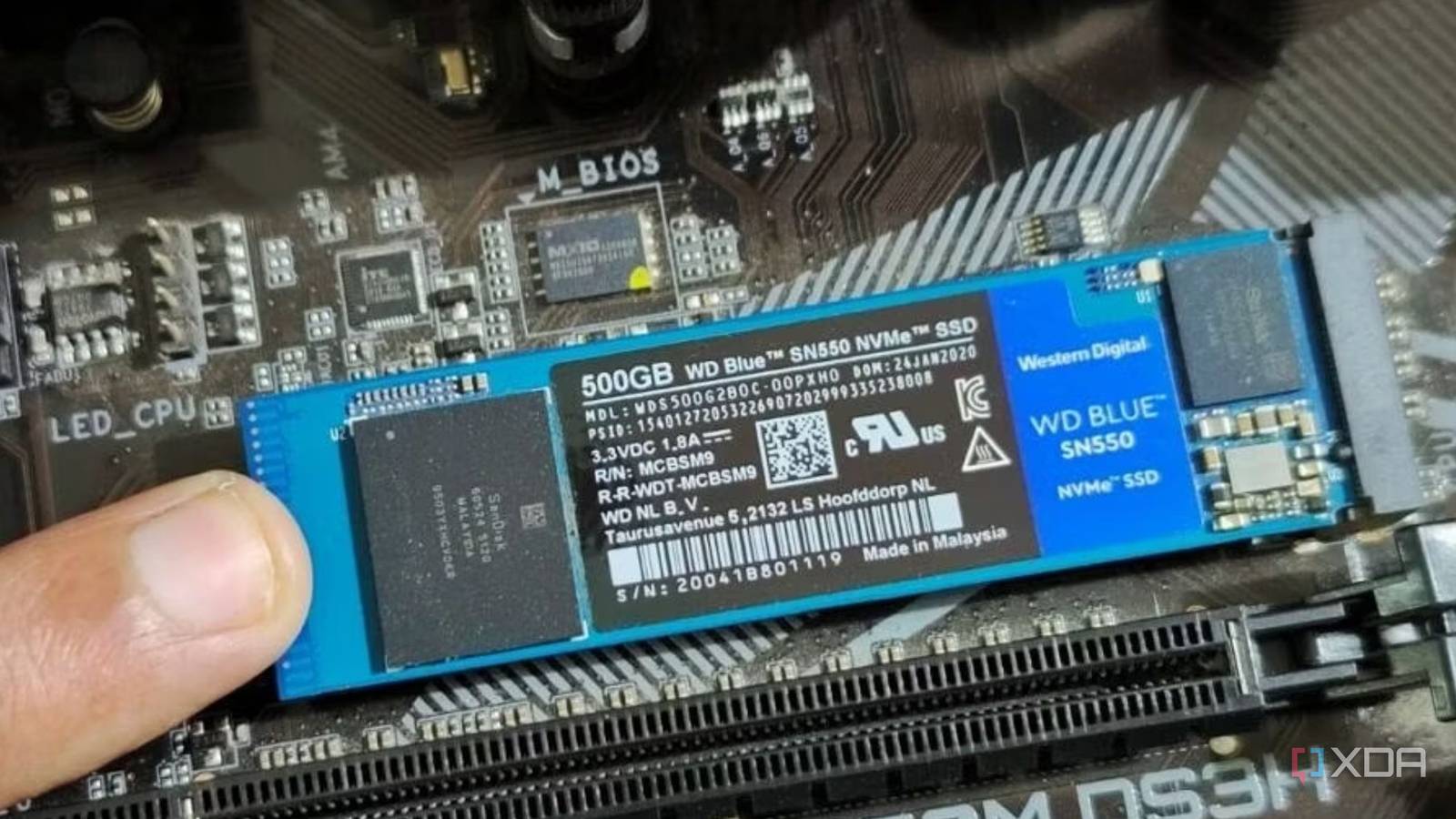
How to check whether an SSD has DRAM
The easiest method is to check the manufacturer’s technical specifications. Look for terms such as “DRAM cache,” “dedicated DRAM,” or the specific memory type and capacity.
Be careful with the word “cache.” Some product pages use it for NAND SLC cache rather than DRAM. If the listing is unclear, check a trusted hardware review or a teardown.
Software tools may identify the controller, NAND, firmware, and sometimes the presence of DRAM. However, software detection is not perfect. Firmware updates and different production batches can also change internal components.
A reliable check includes:
• Exact model number
• Capacity
• Hardware revision
• Controller
• NAND type
• DRAM or HMB support
This matters because manufacturers sometimes change components without changing the product name. Two drives with the same retail label may not perform in exactly the same way.
Frequently Asked Questions About What Is DRAM in SSD
What does DRAM do in an SSD?
DRAM stores the SSD’s mapping table and helps the controller locate data quickly. It can improve random access, multitasking, and sustained performance.
Is DRAM necessary for an SSD?
No, DRAM is not required for an SSD to work. DRAM-less SSDs can use NAND, internal controller memory, or Host Memory Buffer technology instead.
Is a DRAM SSD better for gaming?
A DRAM SSD can offer smoother performance during updates, installations, and multitasking. However, game loading times may be similar to those of a good DRAM-less SSD.
Does DRAM increase SSD lifespan?
DRAM does not directly determine NAND lifespan. It may help the controller manage data efficiently, but endurance depends mainly on NAND quality, firmware, workload, and the drive’s TBW rating.
What is HMB in a DRAM-less SSD?
Host Memory Buffer allows a DRAM-less SSD to use a small amount of system RAM for mapping tasks. It can improve performance, but it is not the same as dedicated DRAM built into the SSD.
Should a laptop use a DRAM SSD?
A laptop can use either type. Choose a DRAM SSD for heavy work, large file transfers, or long-term intensive use; choose a good DRAM-less model when low cost, low power use, and everyday tasks are more important.
Can an SSD lose data if its DRAM loses power?
The mapping information in DRAM is volatile, but the SSD can usually rebuild it from NAND after power returns. Sudden power loss can still cause data corruption, especially on drives without power-loss protection, so regular backups remain essential.
Conclusion
DRAM in an SSD is fast memory that helps the controller track data and manage NAND flash. It can improve random performance and make heavy workloads more consistent, but it is only one part of an SSD’s design.
A DRAM-less SSD can be an excellent choice for everyday computing, gaming, and budget upgrades. For demanding work, frequent large writes, and professional applications, a quality DRAM SSD is often worth the extra cost.
Now that you understand what is DRAM in SSD technology, compare real-world reviews, endurance ratings, NAND type, thermals, and sustained performance before buying. Explore more storage guides, share your SSD experience, or leave a comment about the drive you plan to use.

Everett Ashford is a tech reviewer at mytechgrid.com specializing in SSDs, cameras, TVs, earbuds, headphones, and other consumer electronics. He provides honest, data-driven reviews based on hands-on testing and real-world performance analysis. Everett simplifies complex tech details to help readers make smart, confident buying decisions.