The Steam Deck uses a removable M.2 2230 NVMe SSD, while the 64GB model uses eMMC storage.
Understanding what kind of SSD the Steam Deck uses helps you choose the right model, plan an upgrade, and avoid buying an incompatible drive. Valve designed the Steam Deck around a small PCIe NVMe module, but storage type varies by model. This guide explains the differences, speed limits, upgrade rules, and practical lessons that matter before you open the handheld.

What kind of SSD does the Steam Deck use?
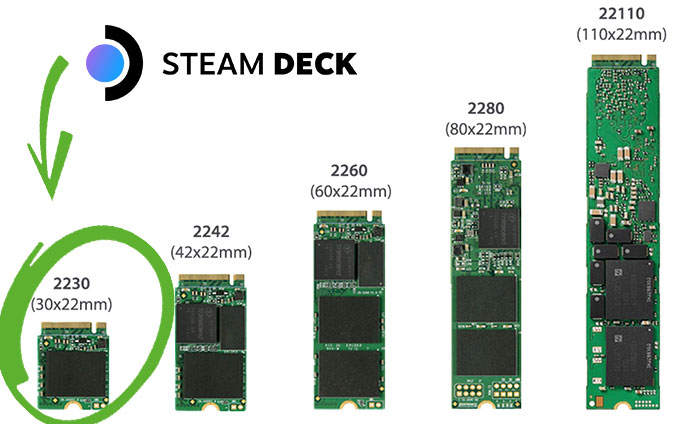
The Steam Deck uses an M.2 2230 NVMe SSD in its 256GB and 512GB LCD models, plus all OLED storage models. The term “2230” describes the drive’s size:
• 22 means the drive is 22 millimeters wide.
• 30 means the drive is 30 millimeters long.
• M.2 describes the connector and physical design.
• NVMe describes the fast storage protocol used over PCI Express.
The Steam Deck’s SSD uses a PCIe 3.0 x4 connection. This gives the drive four PCI Express lanes and allows strong sequential read and write speeds for a handheld gaming PC.
The 64GB LCD Steam Deck is different. It uses eMMC storage rather than an NVMe SSD. eMMC is slower and is soldered to a small module, so upgrading that model is more complex than replacing an M.2 drive.
In simple terms, what kind of SSD does the Steam Deck use? It uses a short M.2 2230 PCIe NVMe drive, not the longer M.2 2280 SSD found in many laptops and desktops.

Steam Deck storage types by model
Valve has sold several Steam Deck versions. The storage type depends on the model you own.
| Steam Deck model | Factory storage | Storage technology |
|---|---|---|
| 64GB LCD | 64GB | eMMC |
| 256GB LCD | 256GB | M.2 2230 NVMe SSD |
| 512GB LCD | 512GB | M.2 2230 NVMe SSD |
| 512GB OLED | 512GB | M.2 2230 NVMe SSD |
| 1TB OLED | 1TB | M.2 2230 NVMe SSD |
The 64GB LCD version uses slower eMMC storage. It can still run SteamOS and games, but system updates, game installs, and loading screens may take longer than they do on NVMe models.
The 256GB and 512GB LCD versions use an NVMe SSD. The OLED versions also use NVMe storage, although their internal design and battery system differ from the LCD models.
What kind of SSD does the Steam Deck OLED use? It uses an M.2 2230 NVMe SSD. The OLED model does not switch to a newer PCIe generation, so its storage interface remains based on PCIe 3.0.
How fast is the Steam Deck SSD?
The Steam Deck’s NVMe SSD is much faster than eMMC storage. However, the real-world benefit is not only about the maximum speed printed on the box.
An NVMe drive can improve:
• Game installation times
• SteamOS updates
• File transfers
• Shader cache operations
• Game loading in some situations
• System startup and application launches
The Steam Deck does not turn every game into a faster experience simply because it has NVMe storage. Frame rates depend more on the processor, graphics hardware, game settings, and thermal limits.
For example, replacing a slow storage device may reduce loading delays, but it will not make a game run from 30 frames per second to 60 frames per second. Storage affects how quickly data arrives. It does not directly increase graphics power.
The Steam Deck’s PCIe 3.0 interface also limits the benefit of buying an extremely fast PCIe 4.0 or PCIe 5.0 SSD. A newer drive may work in some cases, but the Steam Deck cannot use its full rated speed. A good PCIe 3.0 2230 drive is usually the more sensible choice.

Why does the Steam Deck use an M.2 2230 SSD?
The M.2 2230 format is much shorter than the common M.2 2280 format. Valve used this compact size to fit a full PC, cooling system, battery, controls, and display inside a handheld body.
A 2230 SSD is about 30 millimeters long. A 2280 SSD is about 80 millimeters long. A standard 2280 drive will not fit in the Steam Deck without unsafe modifications.
The small format has some limits:
• 2230 drives are less common.
• Large-capacity options can cost more.
• Some models are harder to find in local stores.
• Cooling and power efficiency matter more in a compact handheld.
The short design is not a flaw. It is a trade-off. Think of it like packing a full desktop into a travel bag: every part must be smaller, lighter, and carefully placed.
When researching what kind of SSD the Steam Deck uses, always check both the size and the interface. “M.2” alone is not enough. An M.2 drive can use different lengths, connectors, and protocols.
Can you upgrade the Steam Deck SSD?
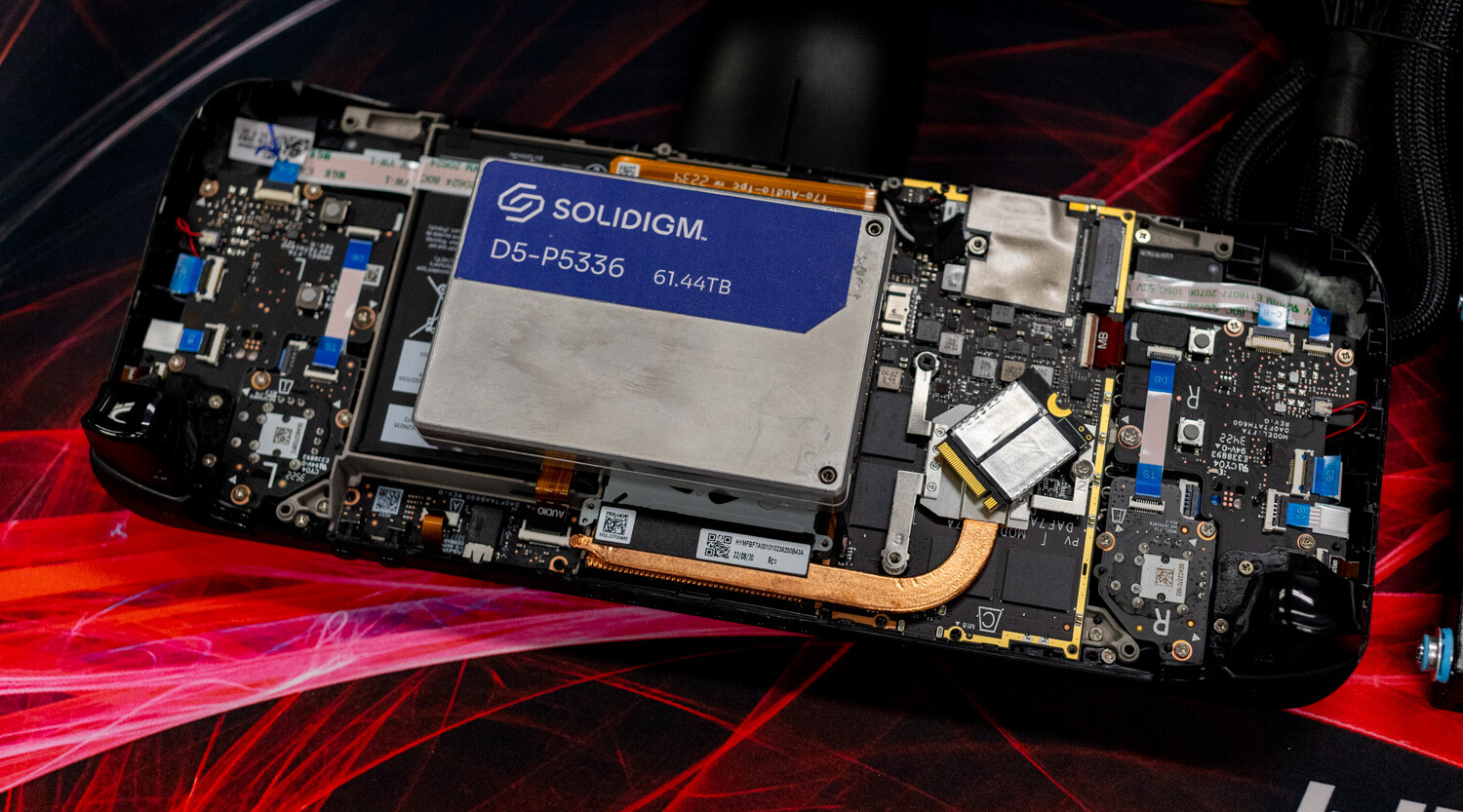
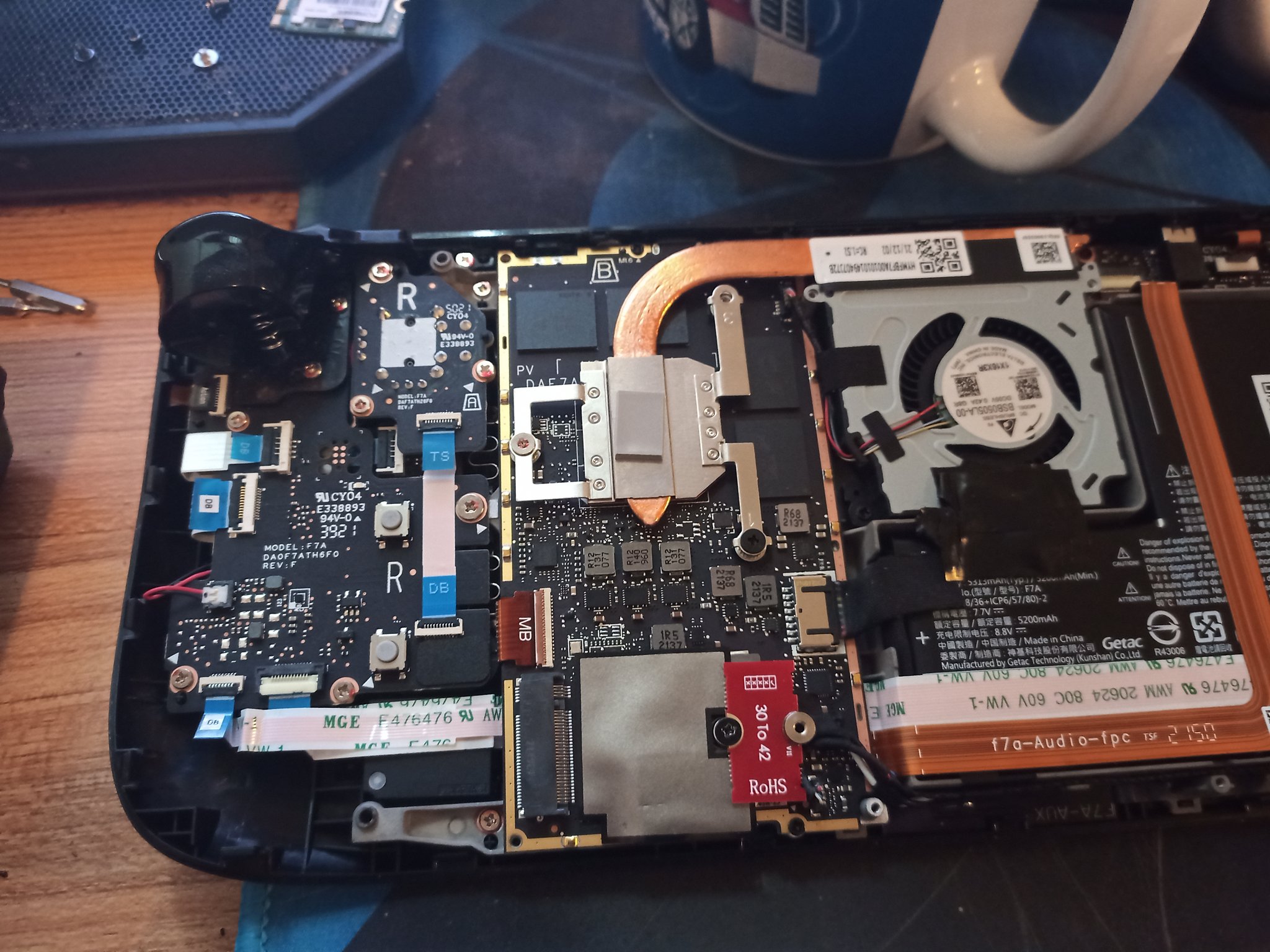
Yes, you can replace the internal SSD in most Steam Deck models. The 256GB and 512GB LCD versions, as well as the OLED versions, use removable M.2 2230 drives.
A typical upgrade involves these steps:
- Back up important files and save data.
- Shut down the Steam Deck completely.
- Remove the rear shell screws.
- Carefully separate the rear cover.
- Disconnect the battery when appropriate.
- Remove the SSD shield or cover.
- Unscrew the original M.2 2230 drive.
- Move the shielding material to the new drive if required.
- Install the replacement SSD.
- Reassemble the Deck and reinstall SteamOS.
The process is manageable, but the rear shell clips can be tight. Using the wrong screwdriver can also damage the screws. A small Phillips screwdriver and a plastic opening tool are safer than improvised tools.
Valve has warned that opening the Steam Deck can increase the risk of damage. It may also affect warranty support if the damage results from the repair. Check the current warranty terms for your region before starting.
The 64GB eMMC model is not a simple SSD upgrade. Its storage module uses a different design, and replacing it requires more technical skill. For many owners, using a microSD card or upgrading through professional repair is the safer choice.
What SSD should you buy for a Steam Deck?
Look for a single-sided M.2 2230 NVMe SSD with a PCIe interface. A 512GB drive offers a good balance for many players, while a 1TB drive is better for large modern games.
Important buying checks include:
• M.2 2230 size
• NVMe protocol
• PCIe compatibility
• Single-sided construction when possible
• Reliable manufacturer
• Good power efficiency
• A suitable return policy
A 2TB 2230 drive may also work if it meets the physical and electrical requirements. However, large 2230 SSDs can produce more heat or cost far more than a 1TB model.
Avoid buying a drive based only on its capacity. A cheap listing may be mislabeled, used, or intended for a different device. Check the full model number and read the technical specifications.
You do not need the fastest SSD available. Since the Steam Deck uses PCIe 3.0, a dependable and efficient drive is often a better choice than a premium PCIe 4.0 model.
One practical lesson is worth remembering: storage capacity is often more useful than benchmark speed. Modern games can take 50GB, 100GB, or more. A reliable 1TB drive can make daily use much easier than a smaller drive with impressive box numbers.

SSD upgrade mistakes to avoid
Many upgrade problems come from choosing the wrong physical size rather than the wrong brand. The most common mistake is ordering an M.2 2280 SSD because it is easy to find and looks similar in product photos.
Avoid these mistakes:
• Buying an M.2 2280 drive
• Confusing SATA M.2 with NVMe M.2
• Ignoring the drive’s thickness
• Forgetting to back up game saves
• Pulling the back cover off too quickly
• Losing the original SSD
• Skipping the battery safety step
• Installing SteamOS without checking the recovery process
• Trusting unusually cheap marketplace listings
Another common issue is forgetting that some Steam games store files locally while cloud saves handle only supported save data. Before replacing the drive, allow Steam Cloud to sync and copy important files manually when possible.
Keep the original SSD in a safe place. It can help with troubleshooting, warranty questions, or restoring the device to its factory state.
If you are not comfortable working with small electronics, a repair shop may be worth the cost. Saving money on a drive is not helpful if a damaged cable, screw, or shell turns the upgrade into a larger repair.

SSD versus microSD card on the Steam Deck
A microSD card is the easiest way to expand Steam Deck storage. It does not require opening the device, and SteamOS supports installing games to the card.
An internal NVMe SSD usually offers better overall performance, especially for system tasks and large file operations. A good microSD card can still run many games well, though loading times may vary.
Use an A2-rated UHS-I microSD card from a trusted brand when possible. The Steam Deck’s card reader has its own speed limits, so a more expensive card will not always produce a major improvement.
An internal SSD is best for:
• The operating system
• Frequently played games
• Large games with heavy file use
• Faster updates and file transfers
A microSD card is useful for:
• Expanding your game library
• Moving games between devices
• Storing older or smaller games
• Avoiding an internal repair
Many owners use both. This approach gives the Steam Deck a fast internal drive and flexible external storage without the risk of opening the handheld.

How to check which storage your Steam Deck has
You can check your storage capacity in SteamOS without opening the device.
- Press the Steam button.
- Open Settings.
- Select Storage.
- Review the listed internal drive and microSD card.
The menu shows available capacity and installed games. It may not always display every technical detail, such as the exact SSD model number.
For deeper information, switch to Desktop Mode and use a Linux storage utility. Tools such as KDE Partition Manager can show drive details, but avoid changing partitions unless you understand the result.
You can also identify the model from the original purchase information. A 64GB LCD Steam Deck has eMMC storage, while the 256GB and 512GB LCD versions have NVMe SSDs. All official OLED storage versions use NVMe SSDs.
Knowing what kind of SSD the Steam Deck uses is especially helpful when shopping for a replacement. The storage screen confirms capacity, but the model specification confirms compatibility.
Does an SSD upgrade improve gaming performance?
An SSD upgrade can improve loading behavior, but it does not transform the Steam Deck’s core gaming power.
You may notice:
• Faster game installs
• Shorter file copy times
• Faster system updates
• Better loading consistency in some games
• More room for large titles
You should not expect:
• A major frame rate increase
• Better graphics quality by itself
• A large battery life improvement
• Automatic removal of stutter caused by the CPU or GPU
Some games stream textures and world data from storage. In those cases, a faster internal SSD may help reduce certain loading delays. Still, game design and software optimization play a large role.
The biggest benefit for many users is capacity. Moving from 64GB to 512GB or 1TB gives SteamOS and modern games more breathing room. It also reduces the need to uninstall games every time a new release arrives.
Frequently Asked Questions
What kind of SSD does the Steam Deck use?
The Steam Deck uses an M.2 2230 NVMe SSD in its 256GB and 512GB LCD models and in its OLED models. These drives use a PCIe 3.0 x4 interface.
Does the 64GB Steam Deck have an SSD?
No. The 64GB LCD Steam Deck uses eMMC storage rather than a removable NVMe SSD. Its storage upgrade path is more difficult than the upgrade path for models with M.2 drives.
Can you put an M.2 2280 SSD in a Steam Deck?
No. The Steam Deck is designed for the much shorter M.2 2230 format. A standard 2280 SSD is too long to fit safely inside the device.
Does the Steam Deck support PCIe 4.0 SSDs?
The Steam Deck uses a PCIe 3.0 storage interface. Some PCIe 4.0 2230 drives may be backward compatible, but they will operate within the Steam Deck’s PCIe 3.0 limits.
Is the Steam Deck SSD replaceable?
Yes, the NVMe SSD in most 256GB, 512GB, and OLED models can be replaced. Opening the device carries a risk of damage, so careful tools and a proper backup are important.
Is a microSD card slower than the Steam Deck SSD?
Usually, yes. A good microSD card works well for many games, but the internal NVMe SSD generally offers faster file transfers and more consistent storage performance.
What is the best SSD size for a Steam Deck?
A 512GB SSD suits light and moderate users, while a 1TB SSD is a strong choice for players with a large library. Choose based on capacity, reliability, power use, and compatibility rather than advertised peak speed alone.
Conclusion
The Steam Deck uses a removable M.2 2230 NVMe SSD with a PCIe 3.0 x4 interface in its 256GB, 512GB, and OLED models. The 64GB LCD version uses eMMC storage, which is slower and less convenient to replace.
For an upgrade, choose a reliable M.2 2230 NVMe drive from a trusted seller. Confirm the size, interface, and physical fit before buying, and back up your data before opening the handheld. If an internal repair feels risky, a quality microSD card remains a simple storage solution.
Now that you know what kind of SSD the Steam Deck uses, compare compatible 2230 models carefully and choose the capacity that fits your game library. Share your upgrade experience or storage setup in the comments.

Everett Ashford is a tech reviewer at mytechgrid.com specializing in SSDs, cameras, TVs, earbuds, headphones, and other consumer electronics. He provides honest, data-driven reviews based on hands-on testing and real-world performance analysis. Everett simplifies complex tech details to help readers make smart, confident buying decisions.