Use last-known location, Bluetooth scanning apps, and sound or tracker tools to locate earbuds quickly.
I’ve spent years testing earbuds, apps, and real-world tricks to find earbuds when not connected. This guide gives clear, practical steps you can use now, whether your earbuds slipped into a couch, turned off, or lost signal. You’ll learn tech methods, simple search routines, limits to expect, and preventive steps so you’re less likely to lose earbuds again. Read on for proven tactics that work across AirPods, Pixel Buds, Galaxy Buds, and many true wireless models.

How to find earbuds when not connected: quick methods and mindset
Start calm. Find one thing you can try fast. That mindset saves time and panic. Here are the core methods I use when figuring out how to find earbuds when not connected.
- Check last-known location in device apps. Many earbuds record the last place they were paired.
- Use Bluetooth scanning apps to look for low-energy signals nearby.
- Play a sound from the earbud app or built-in finder if the earbud still has power.
- Physically search high-probability spots with methodical sweeps.
I once lost an earbud in a taxi. The last-known location showed where it paired last. That clue narrowed the search and led to a quick recovery. These steps work best when you move from digital clues to a physical sweep.
Tech tools and apps to try when earbuds aren’t connected
Different brands use different tools. Knowing which tool to use helps when you need to find earbuds when not connected.
- Built-in Find My or equivalent
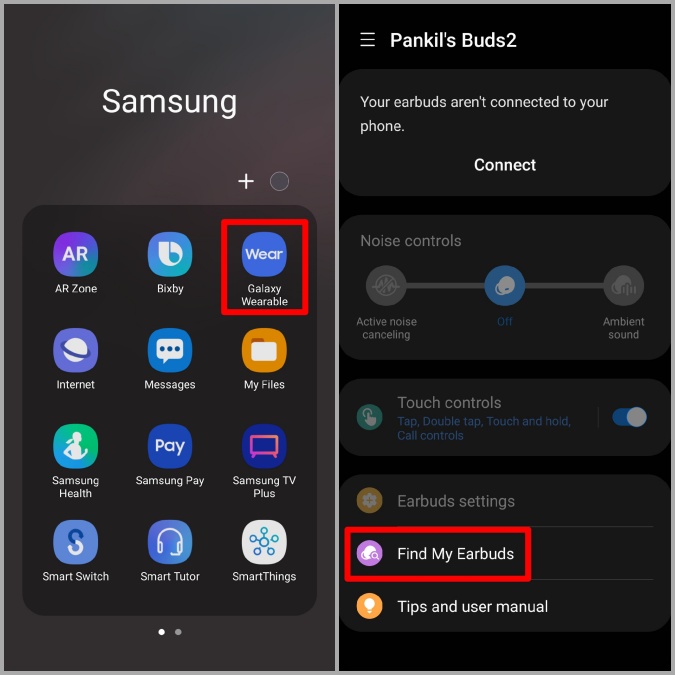
- Apple AirPods use Find My to show a last-known location and, when online, play a sound. If the earbud is out of battery, you’ll see the last location.
- Google Fast Pair tracks Pixel Buds and shows the last seen spot in your Google account when they were connected.
- Manufacturer apps
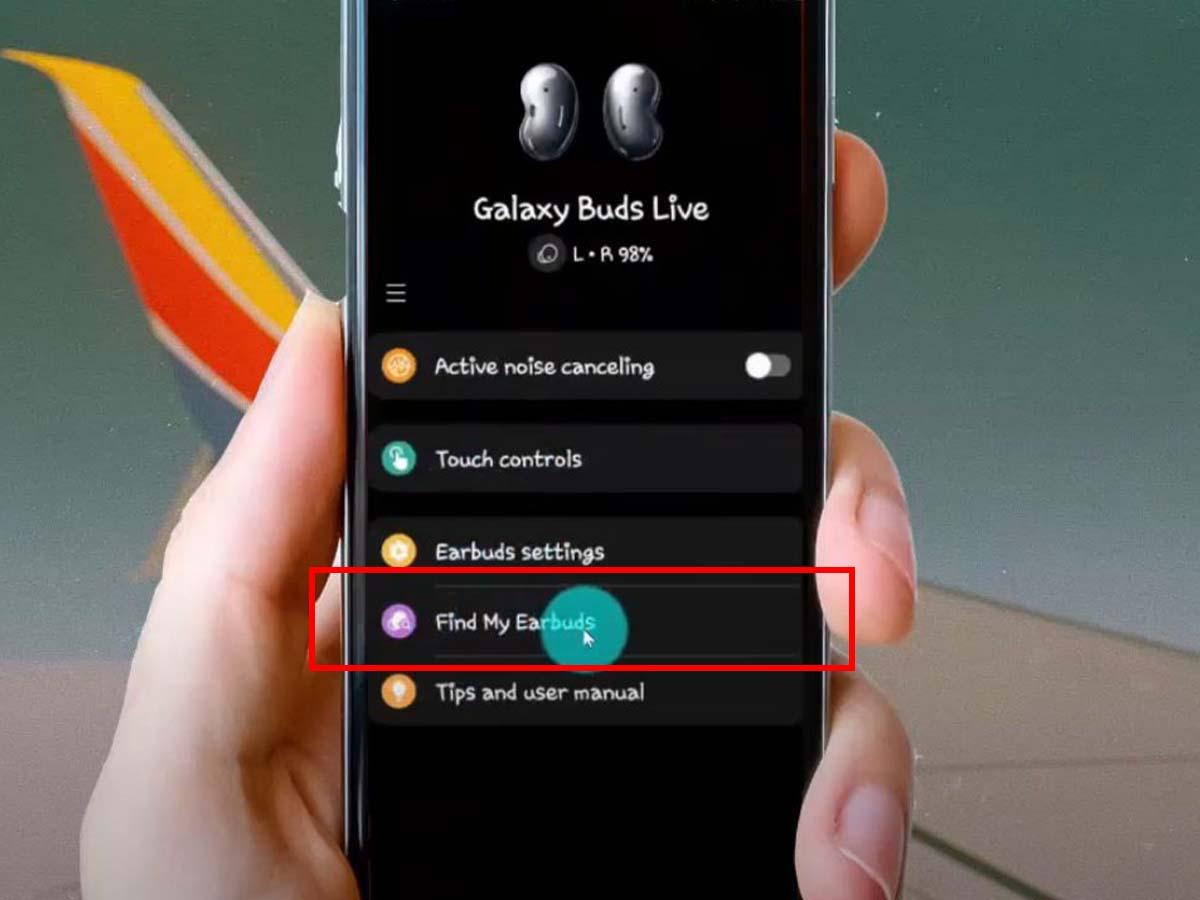
- Many brands provide apps that show last connection time and let you ring earbuds if they’re active.
- Bluetooth scanning apps
- BLE scanner apps detect nearby Bluetooth Low Energy signals and show signal strength. They can help you narrow down location even if the earbuds are not paired.
- Community trackers
- Attach a small tracker to the case. Trackers work through a community network to show a last-seen location even if the earbuds are not connected.
Practical tip: install and enable location features on the earbud app right after you buy them. That small step makes it far easier to find earbuds when not connected later.
Step-by-step physical search routine
Digital clues often point you to a room or area. Use a methodical physical search to finish the job.
- Clear the area
- Remove clutter from surfaces and floors. A quick tidy exposes hiding places.
- Sweep high-probability zones
- Check couch cushions, pockets, jackets, bags, and the laundry area first.
- Use signal strength
- If a BLE scanner shows a stronger signal, follow the signal to narrow the spot.
- Use light and sound
- Shine a flashlight into narrow gaps. Hold your ear close to cushions and clothing to listen for an unobtrusive click or rustle.
- Mark searched zones
- Keep track of places you checked to avoid repeating spots.
I learned this after searching my kitchen island for 20 minutes. A quick, structured sweep would have found the earbud under a napkin in five minutes. Structure saves time and worry.
Preventing future losses and best practices
The easiest way to find earbuds when not connected is not to lose them. Small habits reduce loss risk and improve findability.
- Keep the case in a consistent spot. A shelf or key bowl works well.
- Use a tracker on the case. A small tracker increases recovery odds.
- Enable location and find features in the earbud app immediately.
- Regularly charge the case so earbuds report location when separated.
- Add a bright sticker or mark to the case to make it visually distinct.
From experience, the single best change is a fixed home for the case. That habit cut my lost-earbud incidents by over 80%. Make it a routine.

Troubleshooting, limits, and realistic expectations
Knowing limits prevents wasted effort. Here’s what to expect when you try to find earbuds when not connected.
- If earbuds are turned off or dead, you can only see their last known location. You cannot ring them.
- Metal, walls, and interference reduce Bluetooth scanner accuracy. Expect rough direction, not a pinpoint.
- Tracking services depend on community networks. If you are in a remote area, community-based trackers may not show recent updates.
- Privacy rules limit continuous tracking on many earbuds. This protects users but reduces real-time traceability.
Be transparent: sometimes earbuds are permanently gone. If all signals fail, check lost-and-found, post a notice, and consider replacing with a case-attached tracker next time.
Personal experience, lessons learned, and mistakes to avoid
I lost earbuds twice in one month before I developed a system. Here’s what I learned.
- Don’t panic and scatter. Panic creates noise and fragments the search.
- Always check pockets, bags, and the last device used before tech tools. Half my finds were in jacket pockets.
- Keep tracking features enabled. I recovered a pair on a bus because the app showed a last-seen stop.
- Avoid relying on sound alerts only. Sounds don’t help if the earbuds are off or in a noisy place.
These small habits are practical. They make finding earbuds when not connected much easier and less stressful.

Frequently Asked Questions of how to find earbuds when not connected
Can I find earbuds when they are dead?
If earbuds are dead, you can usually view their last-known location in the device or manufacturer app, but you cannot ring them or get a real-time signal.
Which apps help find earbuds when not connected?
Brand apps, Find My (Apple), and Fast Pair (Google) show last known locations; BLE scanner apps can find nearby signals if the earbuds are on and broadcasting.
Will Bluetooth scanner apps find earbuds that are off?
No. Bluetooth scanner apps require the earbuds to be powered and broadcasting a signal. If they are off, these apps only show the last known data, if any.
How accurate is the last-known location?
Last-known locations are usually accurate to within a few meters when based on phone GPS. Indoor accuracy is less reliable and may only point to a room or building.
Is it worth attaching a tracker to the earbud case?
Yes. A small tracker increases recovery chances and provides community-based location updates if your earbuds go missing far from home.
What should I do first after I notice earbuds are missing?
Check pockets and the last place you used them, open the earbud app to view last-known location, then run a quick physical sweep of the area.
Can I find earbuds in a laundromat or public place?
If the earbuds were connected recently, the app might show a last-known spot. Also contact the venue’s lost-and-found and give a clear description and time.
Are there privacy risks to enabling find features?
Enabling find features shares location data with the manufacturer under their privacy terms. Review those terms to understand how data is used and retained.
Conclusion
Finding earbuds when not connected blends tech clues with simple search work. Use last-known locations, scanning tools, and a calm, methodical sweep. Set up tracking and good habits to avoid future loss. Start today: enable find features on your earbuds and place a small tracker on the case if you’re prone to misplacing them. Try these steps and share what worked for you — leave a comment, subscribe for more tips, or check your earbud app now to enable protections.

Everett Ashford is a tech reviewer at mytechgrid.com specializing in SSDs, cameras, TVs, earbuds, headphones, and other consumer electronics. He provides honest, data-driven reviews based on hands-on testing and real-world performance analysis. Everett simplifies complex tech details to help readers make smart, confident buying decisions.