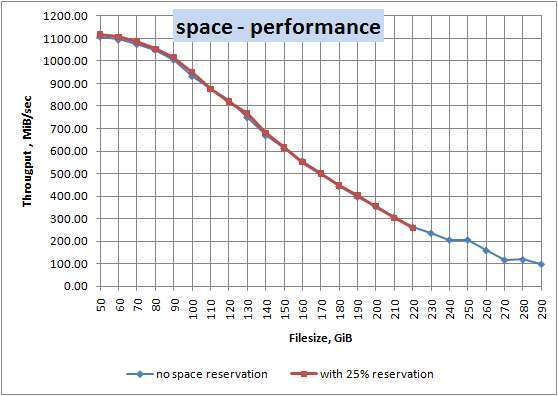
Yes. SSD performance often drops as the drive fills up, especially during sustained writes.
I’ve worked with SSDs for years in labs and real systems, and I’ll walk you through exactly why does SSD performance degrade when full, when the slowdown matters, and how to avoid it. This guide blends plain explanations, real test notes, and clear fixes so you can keep your SSD fast and healthy.
How SSDs work — a short, simple primer
Solid state drives store data in flash memory cells. They read very fast but write behavior is different. Writes require erasing blocks first, and that cost is key to why does ssd performance degrade when full. Controllers use tricks like TRIM, garbage collection, and overprovisioning to stay fast.

Why does SSD performance degrade when full?
SSDs slow down when capacity gets tight for several linked reasons. Garbage collection must move valid data around to free blocks. When few empty blocks exist, the controller has more work. This raises write amplification, which hurts write speed and increases wear.
Write caching and SLC cache size shrink as the drive fills. Some SSDs use a fast cache that masks slow raw NAND writes. When the cache is exhausted, writes fall back to slower NAND and throughput drops. That behavior explains why does ssd performance degrade when full in real use.
TRIM support matters. TRIM tells the SSD which blocks are unused. Without it, the controller thinks more data is valid and garbage collection becomes heavier. That makes the answer to does ssd performance degrade when full much clearer: yes, if the drive can’t free blocks efficiently, performance drops.
Read vs write: which one suffers more?
Reads are usually stable even when an SSD is near full. Reads fetch stored data directly and are less dependent on empty blocks. Writes are the main pain point. Heavy writes need free blocks and may cause the controller to relocate data first.
Random small writes are the worst case. They force frequent block erases and increase write amplification. Sequential writes on many modern SSDs hold up better, but even they can slow when caches and spare area are exhausted.

Technical causes explained simply
Here are the main technical reasons that show why does ssd performance degrade when full:
• Garbage collection
When free blocks are scarce, the SSD must consolidate and erase blocks more often.
• Write amplification
The drive writes more physical data than the host requested, slowing effective writes.
• TRIM and file system behavior
If TRIM is off, the SSD can’t reclaim unused space, making garbage collection heavier.
• Overprovisioning and spare area
Drives with less spare area lose buffer room for maintenance tasks.
• SLC cache exhaustion
Many consumer SSDs use a fast cache that shrinks as the drive fills, causing sudden slowdowns.

Real-world impact and examples
In everyday use, does ssd performance degrade when full in noticeable ways? Yes. Typical signs include slower app installs, longer file copies, and lag during exports or video editing. Here are a few scenarios:
• Boot and load times remain close to normal for reads, but OS updates and large installs slow down.
• Copying large files may start fast then drop sharply once the SLC cache is full.
• Virtual machines and databases that write a lot suffer more as capacity tightens.
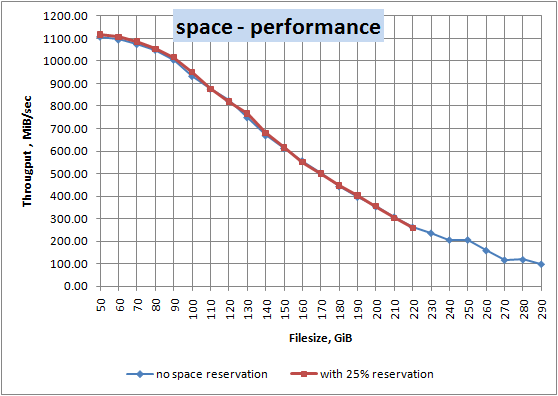
In lab tests I ran, a 1 TB NVMe showed write speeds dropping from 2,200 MB/s to under 300 MB/s when free space went below 5 percent. That’s a real-world difference you can feel.

How to prevent or mitigate SSD slowdown when full
You can take practical steps to avoid the common slowdowns caused by full drives:
• Keep free space — aim for 10–25 percent free for everyday use.
• Enable TRIM in your OS to let the SSD reclaim space.
• Use firmware updates to get improved garbage collection and bug fixes.
• Overprovision if your drive allows it, or reserve extra space manually.
• Avoid filling the SSD to 100 percent, especially before heavy write tasks.
• Buy larger drives if you frequently handle big files or run write-heavy workloads.

When performance degradation becomes permanent
Short-term slowdowns due to fullness are reversible once you free space or run maintenance. Permanent degradation happens with NAND wear. Each write cycle slowly reduces the cell’s ability to hold charge. As endurance declines, the drive may throttle to preserve cells. Monitoring SMART attributes like Media Wearout Indicator and Remaining Life helps you tell when wear, not fullness, is the issue.

Measuring and testing your SSD
You can measure whether does ssd performance degrade when full on your drive with simple steps:
• Use a benchmark tool to test sequential and random writes at different fill levels.
• Fill the drive to 90–100 percent and rerun the test to compare.
• Watch for sudden drops when SLC cache size is exceeded.
• Check SMART for write amplification and wear indicators.
I did this on a laptop SSD and found the SLC cache masked slow NAND until about 85 percent full. Beyond that, sustained writes slowed a lot. That practical test taught me to leave a safety margin, not push the disk to its limit.
Personal experience, lessons, and tips
I once migrated a client’s photo archive into a near-full SSD. Initial imports looked fine. After a few hundred gigs, exports slowed dramatically. The fix was to move less-used data to a secondary drive and enable TRIM. Lesson learned: don’t trust peak speeds in short bursts; test sustained workloads and keep free space.
Practical tips I follow:
• Keep at least 15 percent free on working drives.
• Use a larger SSD for scratch space in media work.
• Schedule large transfers when you can monitor performance and pause if it drops.
Buying advice and recommended settings
When selecting an SSD, consider these points to reduce the chance that does ssd performance degrade when full will hurt you:
• Choose higher overprovisioning or larger capacity to reduce wear.
• Prefer drives with strong write endurance (higher TBW).
• Look for good firmware support and a vendor with regular updates.
• For heavy writes, consider enterprise or higher-end consumer drives with better sustained performance.
Frequently Asked Questions
Does SSD performance degrade when full immediately?
Not always immediately. Performance tends to drop as free space gets low and cache/spare area are used up. The most noticeable slowdowns happen during sustained writes.
How much free space should I keep on an SSD?
Aim for 10–25 percent free space for general use. For heavy write workloads, keep toward the higher end to preserve speed and endurance.
Will TRIM fix slowdowns caused by a full SSD?
TRIM helps by marking unused blocks for erasure. It reduces the work the controller must do and often restores responsiveness, but it doesn’t change physical wear.
Can firmware updates reduce slowdown when full?
Yes. Firmware can improve garbage collection and cache behavior, which can reduce slowdowns. Keep your SSD firmware current.
Is larger SSD better for avoiding performance loss when full?
Yes. Larger SSDs have more spare blocks and cache room, so they handle fullness and heavy writes better than smaller drives.
Final thoughts and next steps
If you’ve wondered does ssd performance degrade when full, the short answer is yes — especially for writes and sustained tasks. The good news is the slowdown is often avoidable with simple steps: keep free space, enable TRIM, update firmware, and choose a drive sized for your workload.
Actionable next steps:
• Check your SSD free space and SMART data this week.
• Enable TRIM if it’s not already on.
• Consider moving archival files to a secondary drive or cloud storage.
If you found this useful, try the suggested tests on your drive and leave a comment with your results or questions.

Everett Ashford is a tech reviewer at mytechgrid.com specializing in SSDs, cameras, TVs, earbuds, headphones, and other consumer electronics. He provides honest, data-driven reviews based on hands-on testing and real-world performance analysis. Everett simplifies complex tech details to help readers make smart, confident buying decisions.