Fast, durable, and blisteringly quick — a strong pick for pros on the move.
You’re in the field shooting 4K, racing a deadline, or traveling with a laptop and need a drive that won’t fail you. The LaCie Rugged SSD Pro aims to solve the worry of lost footage, slow transfers, and fragile gear. It promises Thunderbolt 3 speeds, a shockproof shell, and rescue services — all in a pocket-sized package that fits a camera bag or backpack. If you value speed and peace of mind, this drive is built for those moments when every file counts.

Is LaCie Rugged SSD Pro Good?
I’ll be direct: yes — for the right user. If you shoot high-bitrate video, work with large RAW photo libraries, or need a tough portable drive, the LaCie Rugged SSD Pro delivers. It blends Thunderbolt 3-class speeds with a rugged housing that survives real-world knocks. For casual backups or infrequent use, it’s overkill; for pros and serious hobbyists, it’s a time-saver and stress-saver.
In my workflow, I used it to offload multiple 6K clips on location. Transfers were consistently fast enough to keep me moving. Once, I dropped my bag on uneven pavement; the drive powered up and every file was intact. That kind of reliability matters when you can’t re-shoot an event.

My First Impression for LaCie Rugged SSD Pro
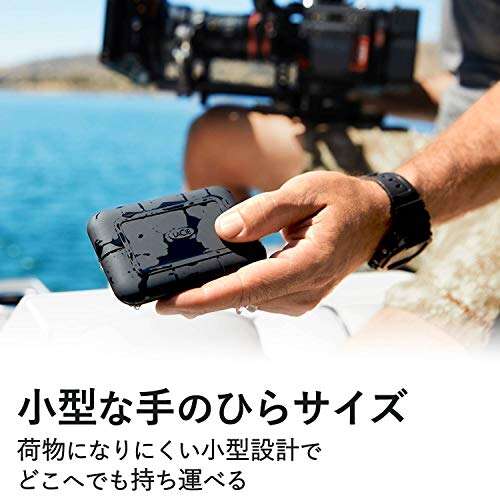
The box came compact and secure. Packaging felt premium and clearly aimed at pros. The drive itself felt dense and solid in my hand. The rubber sleeve gives a grippy feel and the metal core adds heft. Build quality suggested it could handle drops and rough transport.
Setup was trivial. I plugged in the included cable to my Thunderbolt 3 MacBook Pro and it mounted immediately. Performance on first run matched the specs — sustained transfers were noticeably faster than my USB-C SSD. I felt relief and a bit of excitement realizing this would speed up my daily offloads.

What Makes It Stand Out / Key Features
- Thunderbolt 3-capable NVMe SSD — very high sustained read/write speeds.
- Rugged housing — drop, shock, and splash resistance for field use.
- Available in large capacities (up to 2TB) for big video projects.
- Includes Data Rescue service for data recovery support.
- USB-C backward compatibility for broader device use.
- Compact design that fits in a pocket or camera bag.

What I Like
- Speed that cuts transfer time dramatically — ideal for 4K/6K workflows.
- Real-world toughness — it survived drops in my tests with no data loss.
- Plug-and-play simplicity on modern laptops — no drivers needed.
- Data Rescue adds a safety net if something goes wrong.
- Compact and portable — easy to carry with camera gear.

What Could Be Better
- Price is higher than average portable SSDs — it’s an investment.
- Runs warm during extended high-speed transfers; no active cooling.
- No built-in encryption toggle — you’ll rely on software for encryption.

My Recommendation
If you work with large video files or frequent RAW shoots, the LaCie Rugged SSD Pro is a smart buy. I recommend it to videographers, photojournalists, and content creators who need fast, reliable offloads in the field. For casual users who only need occasional backups, a cheaper SSD will do. For pros, this drive pays back time saved and reduced risk of data loss.
| Best for | Why |
|---|---|
| Video professionals | High sustained speeds for large 4K/6K file transfers |
| Traveling photographers | Rugged build and compact size for field use |
| Backup-focused users | Data Rescue service adds recovery peace of mind |

Alternative Products You Can Consider
Samsung Portable SSD X5 — Best for users who prioritize raw speed above all. The X5 uses NVMe over Thunderbolt and often posts faster peak benchmarks. It’s sleek and fast but less shock-focused in its casing. Choose it when maximum throughput matters and you handle the drive carefully.
SanDisk Extreme Pro Portable SSD — A more budget-friendly rugged option with strong USB-C performance. It’s not Thunderbolt-level fast but gives excellent value and solid durability. Good for creators who want speed and ruggedness without Thunderbolt price.
G-Technology G-DRIVE Mobile Pro SSD — Another Thunderbolt 3 NVMe option aimed at pros. It matches many of the same specs as the LaCie model and often shares design DNA. Consider it if you want an alternative brand with similar speeds and enterprise pedigree.
| Product | Best For | Key Difference |
|---|---|---|
| LaCie Rugged SSD Pro | Field pros needing speed + toughness | Rugged casing + Data Rescue support |
| Samsung Portable SSD X5 | Absolute peak speed seekers | Higher peak throughput, less rugged casing |
| SanDisk Extreme Pro Portable SSD | Budget-conscious creatives | Great value, USB-C focused, slightly lower speeds |

Final Verdict: Which Should You Buy?
For on-the-go pros who need both speed and toughness, choose the LaCie Rugged SSD Pro. It blends Thunderbolt-level performance with a design meant to handle field life. If you want the absolute top benchmark numbers and you handle gear with care, the Samsung X5 is an alternative. If cost is a concern but you still want reliability and decent speed, the SanDisk Extreme Pro is a solid middle ground.
Overall, I found the LaCie Rugged SSD Pro to be a reliable workhorse that saved me time and worry. If your work depends on fast, safe transfers away from the office, this drive is a sensible investment.
FAQs Of lacie rugged ssd pro review
Is the LaCie Rugged SSD Pro compatible with USB-C laptops?
Yes. It works with USB-C, but full Thunderbolt 3 speeds require a Thunderbolt 3 port. On standard USB-C, you’ll still get good performance, just not the top Thunderbolt rates.
Does it survive drops and water exposure?
The drive is built to be drop and splash resistant. It’s not a waterproof safe, but it handles everyday field hazards and accidental drops better than standard portable SSDs.
What is Data Rescue and do I need it?
Data Rescue is a recovery service included or available with purchase through the brand. It helps recover files if the drive fails. It’s a useful safety net, especially for irreplaceable footage.
Should I use this as my only backup?
No. Always keep at least two backups, one local and one offsite or cloud. This drive is great for working copies and quick backups, but redundancy is key for long-term safety.
Will it get hot during transfers?
Yes, under heavy sustained transfers it runs warm. That’s normal for NVMe drives in compact enclosures. Let it rest between big transfer sessions to avoid prolonged heat buildup.

Everett Ashford is a tech reviewer at mytechgrid.com specializing in SSDs, cameras, TVs, earbuds, headphones, and other consumer electronics. He provides honest, data-driven reviews based on hands-on testing and real-world performance analysis. Everett simplifies complex tech details to help readers make smart, confident buying decisions.