Most laptops cost $300 to $2,000, while premium workstations and gaming models can exceed $4,000.
Understanding how much is a laptop takes more than checking one price tag. The right cost depends on the laptop’s processor, memory, storage, screen, battery, build quality, and intended use. This guide breaks down typical laptop prices in the United States so you can spend wisely and avoid paying for power you do not need.
Laptop prices at a glance
For most shoppers, a laptop costs between $300 and $2,000. Basic models handle web browsing and schoolwork, while expensive laptops offer faster chips, better screens, stronger graphics, and longer support.
Here is a simple price guide:
• $200 to $400: Basic Chromebooks and entry-level Windows laptops
• $400 to $700: Reliable student, office, and home laptops
• $700 to $1,200: Mid-range laptops with better speed and build quality
• $1,200 to $2,000: Premium ultrabooks, MacBooks, and gaming laptops
• $2,000 to $4,000 or more: High-end gaming laptops and professional workstations
These ranges can change during holiday sales, back-to-school promotions, and product launches. A laptop listed at $900 may also fall to $650 during a major sale.
How much is a laptop for different types of users?
The best way to answer how much is a laptop is to match the price with your daily tasks. Someone who checks email needs far less power than a video editor or game developer.
Basic laptop: $200 to $400
Basic laptops are made for light tasks. They often include modest processors, 4GB or 8GB of RAM, and 64GB to 128GB of storage.
They work well for:
• Browsing the web
• Watching videos
• Writing documents
• Joining video calls
• Using email and basic school apps
Chromebooks are common in this range. They use ChromeOS and store many files online. They are simple, quick to start, and easy to manage, but they may not run full Windows programs.
A very cheap Windows laptop can look attractive, but slow storage and limited memory may cause frustration. I have seen shoppers save $100 at checkout and then regret it after dealing with slow starts and frozen browser tabs.
Student and everyday laptop: $400 to $700
This price range offers the best value for many people. You can often find an Intel Core i5, AMD Ryzen 5, or similar processor, 8GB of RAM, and a 256GB or 512GB solid-state drive.
These laptops are suitable for:
• School research and online classes
• Microsoft Office and Google Workspace
• Light photo editing
• Streaming and social media
• Remote work and video meetings
Look for a Full HD display, a comfortable keyboard, and at least two USB ports. A slightly heavier laptop with better battery life may be more useful than a thin model with a brighter design.
Premium laptop: $700 to $1,500
Premium laptops usually offer better materials, sharper screens, stronger hinges, improved speakers, and longer battery life. Many use aluminum bodies and high-quality displays.
This range includes several popular laptop categories:
• Thin Windows ultrabooks
• Apple MacBook Air models
• Business laptops
• Large 2-in-1 convertible laptops
• Entry-level creator laptops
At this level, you are paying for the complete experience. The laptop may not be twice as fast as a $500 model, but it can feel much better to use every day.
Gaming laptop: $800 to $3,000 or more
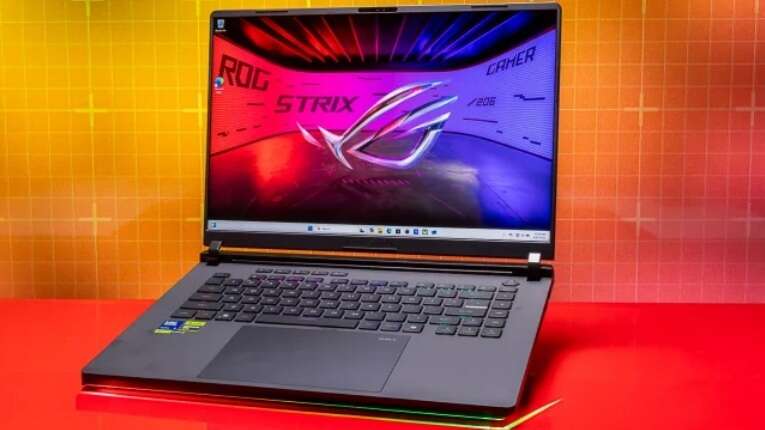
gaming laptops need powerful processors, dedicated graphics, better cooling, and fast screens. Prices rise quickly as the graphics card improves.
A gaming laptop priced around $800 to $1,200 may handle popular games at 1080p resolution. Models above $1,500 often add faster graphics, more memory, better displays, and stronger cooling.
Gaming laptops are also useful for:
• 3D design
• Game development
• Architecture software
• Engineering programs
• Machine learning tasks
They do have limits. Gaming laptops are often heavier, louder, and less efficient on battery than regular laptops. A powerful model is like a sports car: exciting and fast, but not always the easiest choice for a daily commute.
Professional workstation: $1,500 to $4,000 or more
Workstations are designed for demanding professional software. They may include high-end processors, professional graphics cards, large amounts of RAM, and strong cooling systems.
They are used for:
• 4K and 8K video production
• Computer-aided design
• Scientific computing
• 3D animation
• Software development
• Large data sets
For most users, a workstation is unnecessary. If your work does not use specialized software, a premium laptop can provide a better balance of cost, weight, and battery life.

What affects laptop prices?
Several hardware features explain how much is a laptop. Two models may look similar but have very different internal parts.
Processor
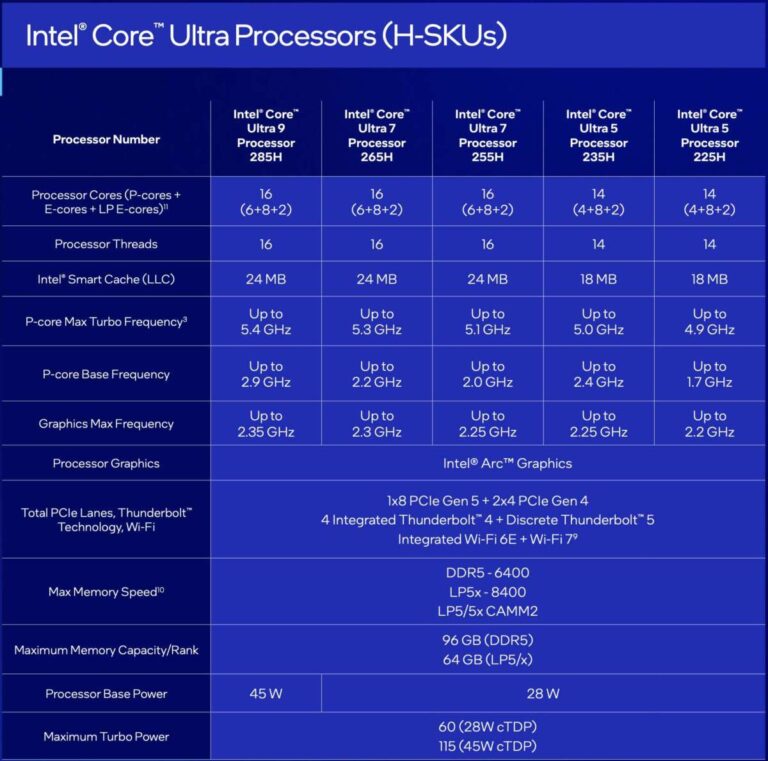
The processor, or CPU, handles instructions and general tasks. Newer processors usually offer better speed and power efficiency.
Common choices include:
• Intel Core 3, Core 5, Core 7, and Core Ultra models
• AMD Ryzen 3, Ryzen 5, Ryzen 7, and Ryzen 9 models
• Apple M-series chips
A mid-range processor is enough for most people. You usually need a high-end chip only for heavy editing, advanced software, or demanding multitasking.
Memory
RAM helps a laptop run several programs at once. More RAM also helps when you keep many browser tabs open.
• 4GB: Only suitable for very light use
• 8GB: Minimum recommended amount for many users
• 16GB: A strong choice for work, school, and creative tasks
• 32GB or more: Useful for professional editing, development, and technical work
If you want the laptop to last several years, 16GB is often a smart target.
Storage
Storage holds your operating system, apps, photos, and files. Solid-state drives are much faster than older hard disk drives.
• 128GB: Limited, but usable for cloud-based work
• 256GB: Suitable for basic use
• 512GB: A practical choice for most people
• 1TB or more: Helpful for games, videos, and large creative projects
A laptop with a 512GB SSD may feel much faster than a cheaper model with a hard drive, even when both have similar processors.
Display
The screen affects both price and comfort. A Full HD display is enough for most work, but premium models may offer higher resolution, better color, or a higher refresh rate.
Consider:
• Screen size
• Resolution
• Brightness
• Color accuracy
• Touch support
• Refresh rate
A 14-inch screen often provides a good balance between working space and portability. A 15-inch or 16-inch model may be better for spreadsheets, editing, and gaming.
Build quality and battery life
Metal bodies, reinforced hinges, larger batteries, and better keyboards can increase the price. These features also affect how long the laptop remains pleasant to use.
A low price is not always a bargain if the hinge breaks, the keyboard feels uncomfortable, or the battery lasts only a few hours. Build quality is an investment in fewer repairs and less daily frustration.

How much is a laptop by operating system?
The operating system can influence both price and software compatibility.
Chromebook prices
Most Chromebooks cost about $200 to $700. They use ChromeOS and work best with web apps, Android apps, and cloud storage.
Chromebooks are a good choice for:
• Students
• Casual users
• Families
• Travel
• Basic office work
They may not support full desktop versions of certain professional programs. Always check software compatibility before buying one.
Windows laptop prices
Windows laptops range from about $300 to more than $3,000. This wide range gives shoppers many choices.
Windows is often the best fit for people who need:
• Microsoft Office
• Business software
• PC games
• Engineering tools
• Specialized desktop apps
The main challenge is comparing specifications. One Windows laptop may offer excellent value, while another may use outdated parts at nearly the same price.
MacBook prices
MacBook prices commonly begin in the lower premium range and can rise above $3,000 with upgraded memory and storage. Apple’s chips provide strong performance and battery life in a thin design.
MacBooks are popular with:
• Writers
• Students
• Designers
• Developers
• Video editors
They are not ideal for every game or Windows-only program. Check the apps you use before choosing macOS.
How much should you spend on a laptop?
A reasonable laptop budget depends on your needs, not on the highest number you can afford.
Use these general guidelines:
• Spend $300 to $500 for browsing, email, and simple schoolwork
• Spend $500 to $800 for daily work, college, and family use
• Spend $800 to $1,500 for premium design, programming, or creative work
• Spend $1,000 to $2,500 for serious gaming
• Spend $1,500 or more for professional editing, 3D work, or engineering
Try to focus on long-term value. A $700 laptop that lasts five years can be cheaper than a $400 laptop that needs replacement after two years.
Before shopping, write down your real needs. Ask yourself:
-
Which programs must the laptop run?
-
How many hours will I use it each day?
-
Do I need to carry it often?
-
Do I store large files locally?
-
Will I play games or edit videos?
-
How many years should it last?
This short list can prevent impulse buying. I have found that shoppers often overestimate processor needs and underestimate the importance of memory, storage, keyboard comfort, and battery life.

How to get the best laptop price
Knowing how much is a laptop is useful, but knowing when and where to buy can save even more money.
Compare the full specifications
Do not compare laptops by brand alone. Check the processor model, RAM, storage type, screen, battery rating, ports, and warranty.
A laptop with a lower price may have:
• Less RAM
• A smaller SSD
• A dimmer display
• A slower processor
• A weaker webcam
• A shorter warranty
The cheapest listing is not always the lowest total cost.
Shop during major sales
Laptop discounts often appear during:
• Back-to-school season
• Black Friday
• Cyber Monday
• Holiday sales
• New product launches
• Clearance events
Older models can be excellent deals when their specifications still meet your needs. However, check how old the processor is and whether the manufacturer still provides updates.
Consider refurbished laptops
Certified refurbished laptops can cost 15% to 40% less than new models. They may be a strong choice when sold by a trusted retailer with a return period and warranty.
Check:
• Battery health
• Cosmetic condition
• Return rules
• Warranty length
• Included charger
• Exact model number
Avoid buying a used laptop with no return option unless you can inspect and test it first.
Avoid unnecessary upgrades
Manufacturers may charge a large premium for extra storage or memory. Sometimes, buying the base model and using external storage is cheaper.
Still, some laptops have memory or storage that cannot be upgraded. Research the upgrade options before making a decision.

Common mistakes when buying a laptop
A laptop purchase can go wrong even when the price seems fair. These are the mistakes I see most often.
Buying too little memory
A laptop with 4GB of RAM may struggle with modern websites and video calls. Choose 8GB at minimum for basic use, and consider 16GB for longer ownership.
Choosing storage that is too small
A 128GB drive can fill quickly after installing apps and saving photos. For many users, 512GB is a more comfortable choice.
Ignoring the keyboard and screen
Specifications do not tell you how pleasant a laptop feels. If possible, test the keyboard, trackpad, screen brightness, and viewing angle in a store.
Forgetting the charger and accessories
Some thin laptops use USB-C charging. Others include large power adapters. You may also need a case, external monitor, mouse, or docking station.
Paying for power you will never use
A high-end processor will not improve simple email work very much. Spend more on features that affect your daily routine, such as battery life, screen quality, and comfort.
Failing to check the return policy
A laptop may look perfect online but feel too heavy or have poor speakers in person. A clear return policy gives you time to test it properly.
Laptop ownership costs beyond the purchase price
The answer to how much is a laptop should include more than the amount paid at checkout. Accessories, repairs, software, and protection can increase the total cost.
Possible extra expenses include:
• Laptop case: $20 to $100
• Wireless mouse: $15 to $80
• External monitor: $100 to $500 or more
• USB-C dock: $50 to $250
• Extended warranty: Varies by model and retailer
• Cloud storage: Often billed monthly or yearly
• Microsoft 365 or other software: May require a subscription
Gaming laptops can also require a cooling pad or replacement charger. Professional users may need specialized software licenses that cost more than the laptop itself.
A good buying plan includes these costs before you set your budget. This prevents a common surprise: spending nearly all your money on the laptop and having nothing left for the tools that make it useful.

Is an expensive laptop worth it?
An expensive laptop can be worth the money when it improves speed, comfort, reliability, or productivity. It is less valuable when the extra features do not match your work.
A premium laptop may offer:
• Faster performance
• Better battery life
• A brighter display
• Stronger materials
• Better speakers and webcam
• Longer software support
• Higher resale value
However, price does not guarantee perfection. Some premium laptops have limited ports, difficult repairs, or expensive upgrades. Read professional reviews, check warranty terms, and compare several models before buying.
The best value is not always the lowest price or the most powerful machine. It is the laptop that meets your needs without creating problems later.
Frequently Asked Questions About How Much Is a Laptop
How much is a good laptop?
A good laptop usually costs between $500 and $1,000 for everyday work, school, and home use. Premium materials, better battery life, and advanced performance can push the price higher.
How much is a laptop for a student?
Most students can find a suitable laptop for $400 to $800. Choose at least 8GB of RAM, a solid-state drive, and enough battery life for a full day of classes.
How much is a laptop for gaming?
A capable gaming laptop often costs $800 to $1,500. High-end models with advanced graphics, fast displays, and more cooling can cost $2,000 or more.
Is a $300 laptop worth buying?
A $300 laptop can be worthwhile for web browsing, email, streaming, and simple documents. It may not be suitable for advanced editing, modern gaming, or heavy multitasking.
How long should a laptop last?
A well-chosen laptop can last about four to seven years, depending on use, build quality, updates, and maintenance. Basic laptops may need replacement sooner if their memory and storage are limited.
Should I buy a laptop or a desktop?
Choose a laptop if you need portability, a built-in screen, and battery power. A desktop usually offers more performance for the money and is easier to upgrade.
Conclusion
The answer to how much is a laptop depends on what you need it to do. Basic models start near $300, reliable everyday laptops often cost $500 to $800, and premium, gaming, or professional systems can reach $2,000 or more.
Focus on the processor, RAM, SSD storage, screen, battery, keyboard, warranty, and software support. Set a practical budget, compare complete specifications, and avoid paying for features you will never use. Start by listing your daily tasks, then choose the least expensive laptop that handles them comfortably for years to come.

Everett Ashford is a tech reviewer at mytechgrid.com specializing in SSDs, cameras, TVs, earbuds, headphones, and other consumer electronics. He provides honest, data-driven reviews based on hands-on testing and real-world performance analysis. Everett simplifies complex tech details to help readers make smart, confident buying decisions.