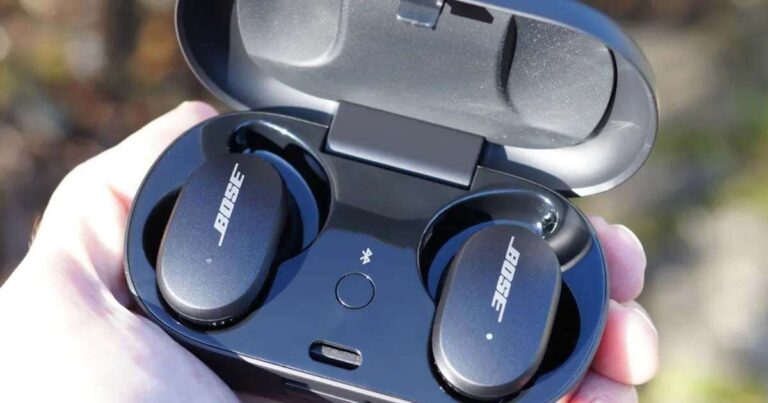
Charge Bose earbuds by placing them in the case and powering the case via USB or wireless pad.
I have used and tested Bose earbuds for years. I will show you exactly how to charge Bose earbuds safely and fast. This guide explains case charging, wireless pads, LED signals, model notes, and fixes for common problems. Read on and you will learn step-by-step actions you can use today.

Understanding how charging works for Bose earbuds
Bose earbuds use a small lithium-ion battery inside each bud and a battery inside the charging case. The case charges the earbuds when they sit in the dock. The case itself charges from a USB cable or a wireless charger, depending on the model.
Indicators tell you charge status. Most Bose cases use LED lights. Single blink, steady light, and color changes mean different states. Learn those signals so you know when your earbuds are ready.
Common terms to know:
- Battery cycle — one full charge and discharge cycle.
- Trickle charge — slow topping up to avoid overcharge.
- Wireless charging coil — the coil inside the case that receives power.
How to charge Bose earbuds: step-by-step
Follow these basic steps to charge Bose earbuds reliably.
- Check the case battery level.
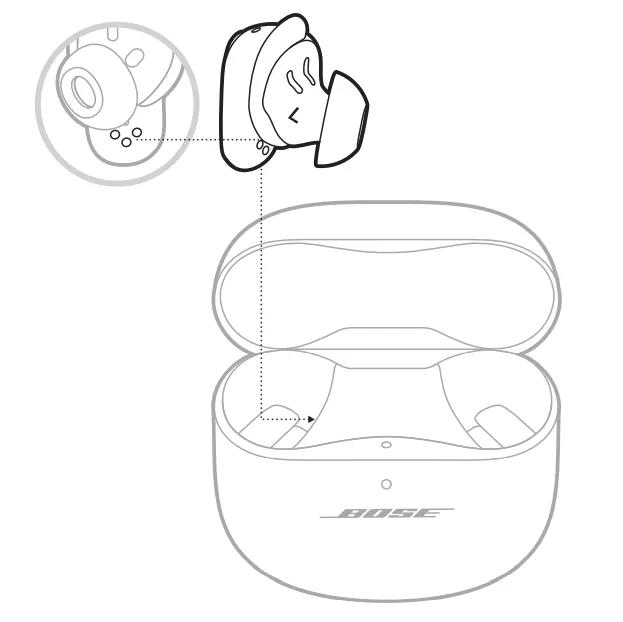
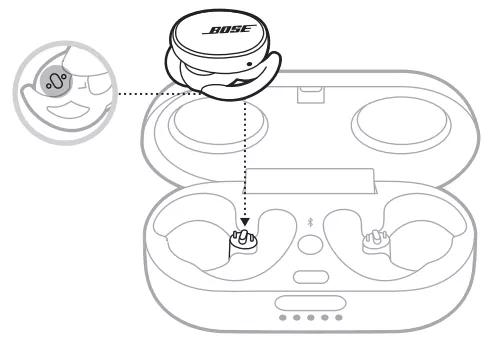
- Place both earbuds in the case. They should click gently into place.
- Close the lid if your case has one. Some models charge faster with the lid closed.
- Connect the case to a power source using the supplied USB cable or place it on a compatible wireless charger.
- Watch the LEDs on the case and the earbuds to confirm charging has started. A steady light usually means charging.
If you need to charge earbuds without a case:
- Plug each earbud into the case if you have one. If you do not, some models will not charge at all without the case.
- For models that allow direct charging, follow the model manual. Most Bose earbuds require the case.
How long to charge:
- Case to full usually takes about 2 hours.
- Earbuds in case typically reach full in 1–2 hours depending on model.
- A quick 15-minute charge often gives 1–2 hours of play time.

Model-specific notes for charging Bose earbuds
Different Bose models have slight differences. Know your model to charge correctly.
Bose QuietComfort Earbuds
- Use the USB-C cable included. Many versions also support wireless charging.
- LED on the case shows case charge. LEDs on each earbud show individual charge.
Bose QuietComfort Earbuds II
- Supports faster charging and wireless charging on the case.
- Firmware updates can improve battery management. Update via the app.
Bose Sport Earbuds
- Case usually charges via USB-C only. No wireless charging on older sport models.
- Remove sweat and debris before placing in the case to ensure good contact.
Bose Sleepbuds (if applicable)
- These may use a unique case design. Always check that the small pins are clean.
- Sleepbuds often require a full charge before first use.
Always check the manual for your model. The exact LED patterns and charging times can differ.

Charging tips and battery care for longer life
Take care of the batteries and you will extend the lifespan. Use simple habits.
- Use the original cable and a reliable adapter. Cheap chargers can harm battery life.
- Avoid extreme temperatures. Do not charge below 32°F (0°C) or above 113°F (45°C).
- Do not leave the earbuds in the case for months without charging. Top up every few weeks.
- Remove earwax and debris from charging contacts with a dry cloth. Dirty contacts stop charging.
- Update firmware when available. Updates can improve battery efficiency.
Avoid these mistakes:
- Leaving the earbuds in a hot car. Heat speeds battery wear.
- Using incompatible fast chargers that push too much power.
- Ignoring LED signals and assuming they are charged when they are not.

Troubleshooting common charging issues
If your earbuds or case do not charge, try these steps.
One earbud not charging:
- Re-seat the earbud in the case. Make sure it clicks into the contacts.
- Clean the contact points on both the earbud and case with a dry cloth.
- Reset the earbuds using the reset steps in your manual.
Case not charging:
- Try a different USB-C cable and wall adapter.
- Test the outlet and wireless pad with another device.
- Inspect the case port for debris or damage.
Slow charging or short battery life:
- Close any apps that use the earbuds heavily.
- Update the earbuds’ firmware in the app.
- Let the case and earbuds run a full charge cycle once a month.
If problems persist, contact support. Warranty may cover faulty batteries.
Safety and specs to know when you charge Bose earbuds
Know the safe limits. These help protect you and the earbuds.
- Battery chemistry: lithium-ion. Treat like other small lithium batteries.
- Typical input: most cases accept USB-C 5V 1A or higher. Wireless pads follow Qi specs.
- Temperature range: charge in normal indoor ranges only.
- Disposal: follow local rules for battery recycling. Do not toss in the trash.
Always follow the safety instructions in the manual. Avoid DIY battery repairs. They can be dangerous.
Personal experience and real-world tips
I once had a pair that would not charge because earwax blocked a tiny pin. A soft brush fixed it in one minute. That taught me to check contacts first.
I learned to keep a spare cable in my bag. When traveling, a short USB-C cable and a compact charger solved many dead-battery moments. I also learned to update firmware often. Some updates fixed charging bugs for me.
Practical habit I use:
- Charge the case every other day if I use the buds daily.
- Do a quick contact wipe once a week.
These small steps keep battery life healthy and prevent surprises.
Frequently Asked Questions of how to charge bose earbuds
How long does it take to fully charge Bose earbuds?
Most Bose earbuds reach full charge in 1–2 hours inside the case. The case itself usually takes about 2 hours to fully charge.
Can I charge Bose earbuds wirelessly?
Some Bose models support wireless charging of the case. Check your model specs or the manual to confirm wireless compatibility.
What if one earbud won’t charge in the case?
Clean the charging contacts and re-seat the earbud. If that fails, reset the earbuds and try a different cable or power source.
Is it safe to use any USB charger to charge Bose earbuds?
Use a quality USB charger. Avoid unknown or very high-output chargers that do not follow standard USB power rules.
How do I reset charging problems on Bose earbuds?
Reset steps vary by model but usually involve placing buds in the case, pressing a button, or using the app. Consult your model’s manual for exact steps.
Will firmware updates affect charging behavior?
Yes. Firmware updates can improve charging stability and battery life. Install updates via the Bose app when available.
Conclusion
You can charge Bose earbuds easily by using the case and the right power source. Learn the LED signals and follow simple care rules to keep battery life strong. Clean contacts, use quality cables, and update firmware to avoid most issues.
Take action now: check your model’s manual, clean your case contacts, and schedule a weekly quick charge habit. If this guide helped, try the tips tonight and leave a comment with your experience.

Jamie Lee is a seasoned tech analyst and writer at MyTechGrid.com, known for making the rapidly evolving world of technology accessible to all. Jamie’s work focuses on emerging technologies, product deep-dives, and industry trends—translating complex concepts into engaging, easy-to-understand content. When not researching the latest breakthroughs, Jamie enjoys exploring new tools, testing gadgets, and helping readers navigate the digital world with confidence.